
Follow Me On Social Media!



Membership websites have become one of the most popular ways to build a sustainable online business. Instead of relying only on advertising or one-time product sales, a membership site allows you to offer exclusive content, tools, or services to people who pay a recurring subscription fee.
For creators, educators, and business owners, this model offers predictable income and a stronger connection with the audience. Members subscribe to access special content such as courses, tutorials, downloads, or community forums.
The good news is that creating a membership website is easier than many people think. With WordPress and the right tools, you can build a fully functional membership platform without needing advanced coding skills.
In this guide, you will learn step-by-step how to create a membership website using WordPress, from choosing hosting to setting up subscription plans and restricting content.
Table of Contents
What Is a Membership Website?
A membership website is a platform where users must register or subscribe to access specific content or features. Instead of making everything publicly available, you can restrict certain areas of your website to members only.
Membership websites are used in many industries. For example, online courses, training communities, premium newsletters, and digital resource libraries all commonly use this model.
Examples of Membership Content
| Content Type | Example |
|---|---|
| Online courses | Video tutorials, lessons, and assignments |
| Downloadable resources | Templates, guides, worksheets |
| Community forums | Private discussion groups |
| Coaching programs | Weekly training sessions |
| Premium articles | Exclusive blog content |
Many successful websites use memberships because they generate recurring revenue instead of relying on one-time purchases.
Why Create a Membership Website
There are several reasons why businesses and creators choose to build membership platforms.
Recurring Income
Membership sites typically use monthly or yearly subscriptions. This creates a predictable income stream that helps businesses grow steadily.
Strong Community
Membership platforms allow you to build a loyal community of people interested in the same topic or industry.
Content Monetization
If you already produce valuable content, you can offer premium versions to paying members.
Authority and Expertise
Membership sites also help establish authority in a niche. When people pay to access your content, it increases the perceived value of your expertise.
Popular Membership Website Examples
| Website Type | Example Idea |
|---|---|
| Fitness membership | Workout plans and diet programs |
| Photography community | Editing tutorials and courses |
| Coding platform | Programming lessons |
| Business coaching site | Marketing resources |
Step 1: Choose a Domain Name and Hosting
Before creating a membership website, you need a domain name and a web hosting provider. Hosting is the service that stores your website files and makes your site accessible online.
A good hosting provider ensures that your membership site runs smoothly and loads quickly for visitors.
Recommended Hosting Features
| Feature | Why It Matters |
|---|---|
| Fast servers | Improves loading speed |
| Security features | Protects member data |
| Automatic backups | Prevents data loss |
| SSL certificate | Secures login information |
| WordPress optimization | Ensures compatibility |
Typical Hosting Costs
| Hosting Type | Average Price |
|---|---|
| Shared hosting | $3 – $10 / month |
| Managed WordPress hosting | $15 – $40 / month |
| VPS hosting | $20 – $80 / month |
Beginners usually start with shared hosting and upgrade later as their membership site grows.
Step 2: Install WordPress
Once you have purchased hosting and a domain name, the next step is installing WordPress.
Most hosting providers offer one-click WordPress installation, which means the setup process only takes a few minutes.
WordPress Installation Steps
Login to your hosting dashboard
Open the WordPress installer
Enter your website details
Click install
After installation, you can access your website dashboard by visiting:
yourdomain.com/wp-admin
This dashboard is where you will manage your content, design, and membership settings.
Step 3: Choose a WordPress Theme
Your theme controls how your website looks and feels. Choosing the right theme is important because it affects both user experience and branding.
For membership websites, you should choose a theme that supports content organization, membership integration, and responsive design.
Features to Look for in a Theme
| Feature | Importance |
|---|---|
| Mobile responsive design | Works on phones and tablets |
| Fast loading speed | Improves user experience |
| Page builder compatibility | Allows easy customization |
| Membership plugin support | Ensures functionality |
Many WordPress themes are specifically designed for membership websites, online courses, or communities.
Step 4: Install a Membership Plugin
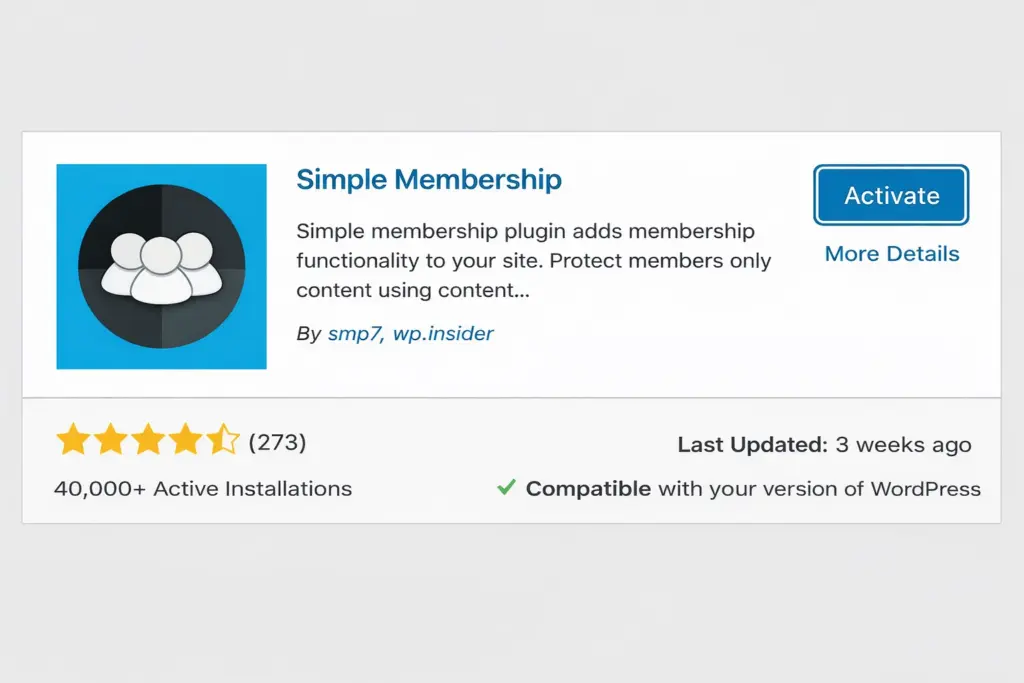
WordPress does not include membership functionality by default. To manage memberships, subscriptions, and restricted content, you need a membership plugin.
These plugins allow you to:
- Create membership levels
- Restrict content to members
- Manage user accounts
- Accept payments
- Track subscriptions
Popular Membership Plugins
| Plugin | Pricing |
|---|---|
| MemberPress | From $179/year |
| Restrict Content Pro | From $99/year |
| Paid Memberships Pro | Free + premium plans |
| Simple Membership | Free plugin |
These plugins provide the tools needed to transform a regular WordPress website into a fully functional membership platform.
Step 5: Create Membership Plans
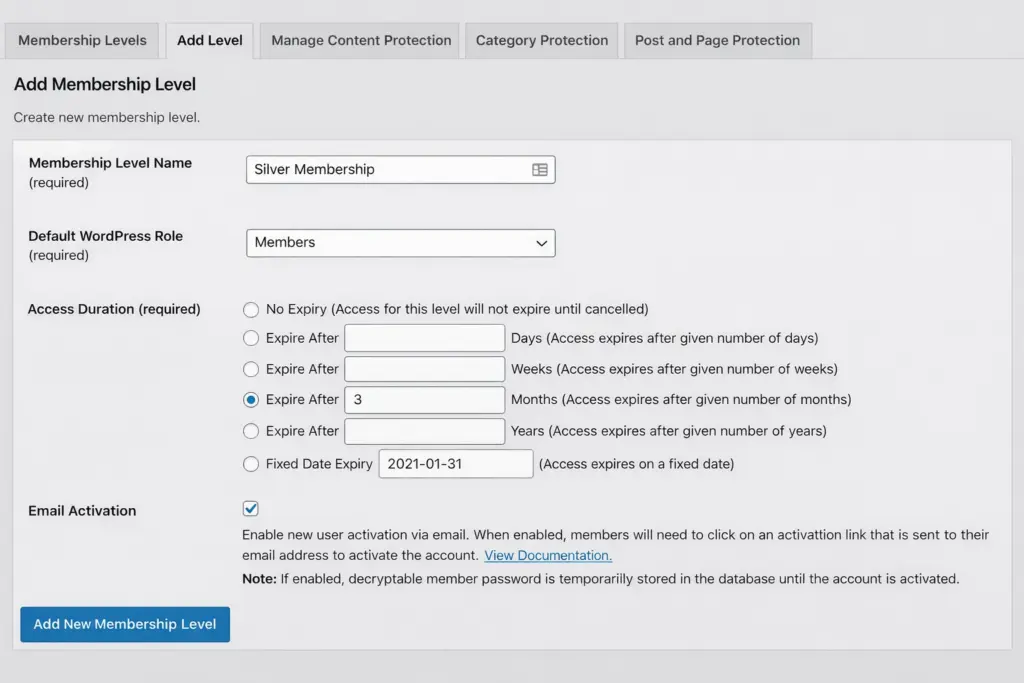
After installing a membership plugin, the next step is creating membership plans.
Membership plans determine what users receive when they subscribe.
Example Membership Levels
| Plan | Price | Features |
|---|---|---|
| Basic | $9/month | Access to premium articles |
| Pro | $19/month | Courses + downloads |
| VIP | $49/month | Coaching sessions + community |
Offering multiple tiers allows users to choose a plan that fits their needs and budget.
Step 6: Restrict Content to Members
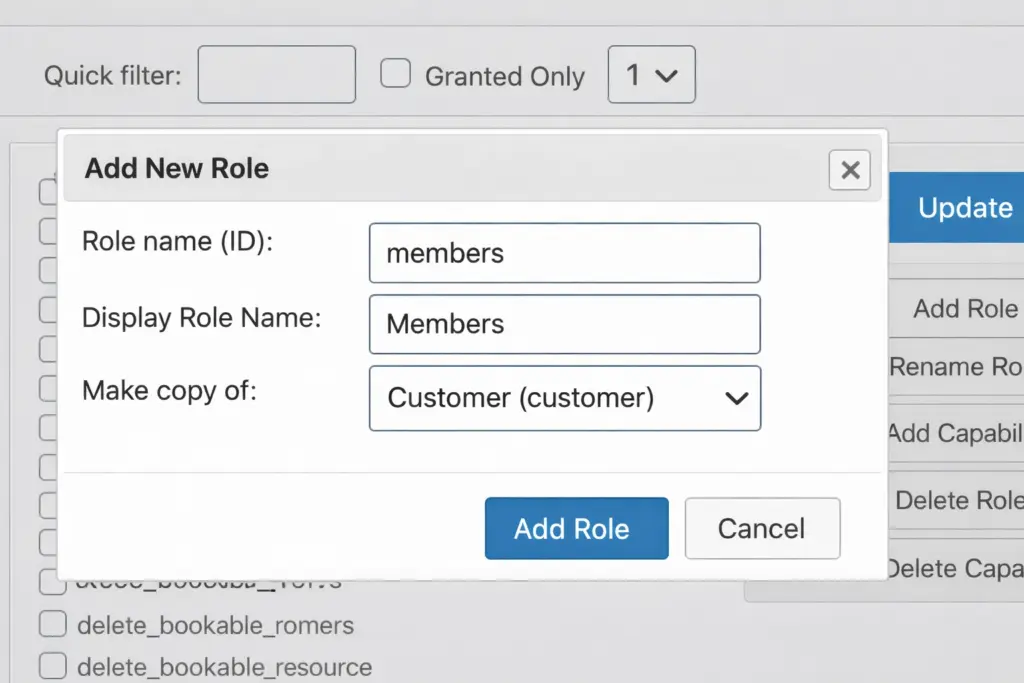
One of the most important parts of a membership site is controlling who can access certain content.
Membership plugins allow you to restrict pages, posts, videos, or downloads so only registered members can view them.
Examples of Restricted Content
- Online training videos
- Private community forums
- Premium articles
- Downloadable templates
This feature ensures that only paying members receive access to valuable resources.
Step 7: Test Your Membership Website
Before launching your website publicly, it’s important to test the entire membership process.
Things to Test
| Test | Purpose |
|---|---|
| User registration | Ensure users can sign up |
| Payment processing | Confirm subscriptions work |
| Login system | Check member access |
| Content restriction | Verify locked content works |
Testing ensures that everything functions properly before real users begin subscribing.
Tips for Running a Successful Membership Website
Creating the website is only the first step. To grow your membership platform, you need to focus on value and engagement.
Provide Valuable Content
Members expect high-quality content that helps them solve problems or learn new skills.
Update Content Regularly
Regular updates keep members engaged and encourage long-term subscriptions.
Build a Community
Community features such as forums or live discussions increase member loyalty.
Offer Different Membership Levels
Providing multiple tiers allows you to reach a wider audience.
Final Thoughts
Membership websites are one of the most powerful ways to monetize online content. Instead of relying on ads or one-time purchases, membership platforms allow you to generate recurring income while building a loyal audience.
With WordPress and the right tools, creating a membership website is straightforward. The key steps include:
- Choosing hosting and a domain
- Installing WordPress
- Selecting a theme
- Installing a membership plugin
- Creating subscription plans
- Restricting content
- Launching your site
Once your website is live, focus on creating valuable content and building a community around your niche.
A well-structured membership website can grow into a long-term business that provides both financial rewards and meaningful connections with your audience.