
Follow Me On Social Media!



When people first think about building a website, they usually start with one simple question: which platform should I use? There are plenty of options today, from website builders to custom-coded solutions, but WordPress still remains the most popular choice for a reason.
It works for beginners who just want to launch a simple blog, but it also gives enough flexibility for businesses, online stores, agencies, and content creators who need something more advanced. That balance is what makes WordPress so powerful. It is easy enough to start with, yet flexible enough to grow with you.
Another reason WordPress continues to stand out is value. You don’t need a huge budget to build something professional. At the same time, if your website grows and your needs become more complex, WordPress can handle that too.
In this guide, we’ll look at the biggest benefits of WordPress and why it continues to be one of the best website platforms to use in 2026.
Table of Contents
What Makes WordPress So Popular?
WordPress is a content management system, often called a CMS. In simple words, it is the software that helps you create, manage, and publish content on your website without needing to code everything manually.
It started mainly as a blogging platform, but today it can be used to build almost any type of website, including:
- blogs
- business websites
- portfolios
- online stores
- membership websites
- course platforms
- news or magazine sites
The reason it remains so popular is because it combines several things that website owners care about most: affordability, flexibility, customization, and control.
Quick overview of WordPress advantages
| Benefit | Why It Matters |
|---|---|
| Low starting cost | You can launch a site without a huge budget |
| Easy to use | Beginners can manage content without coding |
| Highly customizable | Themes and plugins add almost any feature |
| SEO-friendly | Helps websites perform better in search engines |
| Scalable | Works for small blogs and large business sites |
| Strong community | Easy to find support, guides, and solutions |
1. WordPress Is a Cost-Effective Website Solution
One of the biggest reasons people choose WordPress is simple: it offers a lot without forcing you into high upfront costs.
The WordPress software itself is free. That alone makes it attractive compared with closed platforms that charge monthly fees just to access the builder. With WordPress, your main costs usually come from hosting, a domain name, and any premium extras you decide to add.
For small businesses, bloggers, or personal websites, this can make a huge difference. Instead of paying thousands for custom development, you can start with a much smaller budget and improve the site gradually over time.
Typical starting costs for a WordPress website
| Item | Typical Cost |
|---|---|
| Domain name | $10–$20/year |
| Basic hosting | $3–$10/month |
| Premium theme | $50–$100 one-time or yearly |
| Premium plugins | $20–$200/year depending on tools |
That means many websites can get started for well under the cost of custom development.
Another big advantage is that WordPress lets you grow in stages. You don’t have to buy every premium tool from day one. You can start with a free theme, a few essential plugins, and basic hosting, then upgrade later when your site grows.
This makes WordPress especially useful for:
- new businesses
- bloggers
- freelancers
- startups
- local service websites
It gives you room to build professionally without forcing you into a large financial commitment at the beginning.
2. It’s Easy to Use, Even for Beginners
WordPress has become much easier to use over the years. You no longer need to be a developer just to publish a page or update your website text.
The dashboard is organized clearly, and once you understand the basics, everyday tasks become simple. You can create posts, edit pages, upload images, manage menus, and install plugins without touching code.
The block editor, also known as Gutenberg, made content creation even more visual. Instead of writing everything in one plain text box, you build content using blocks for headings, paragraphs, images, buttons, lists, galleries, and more.
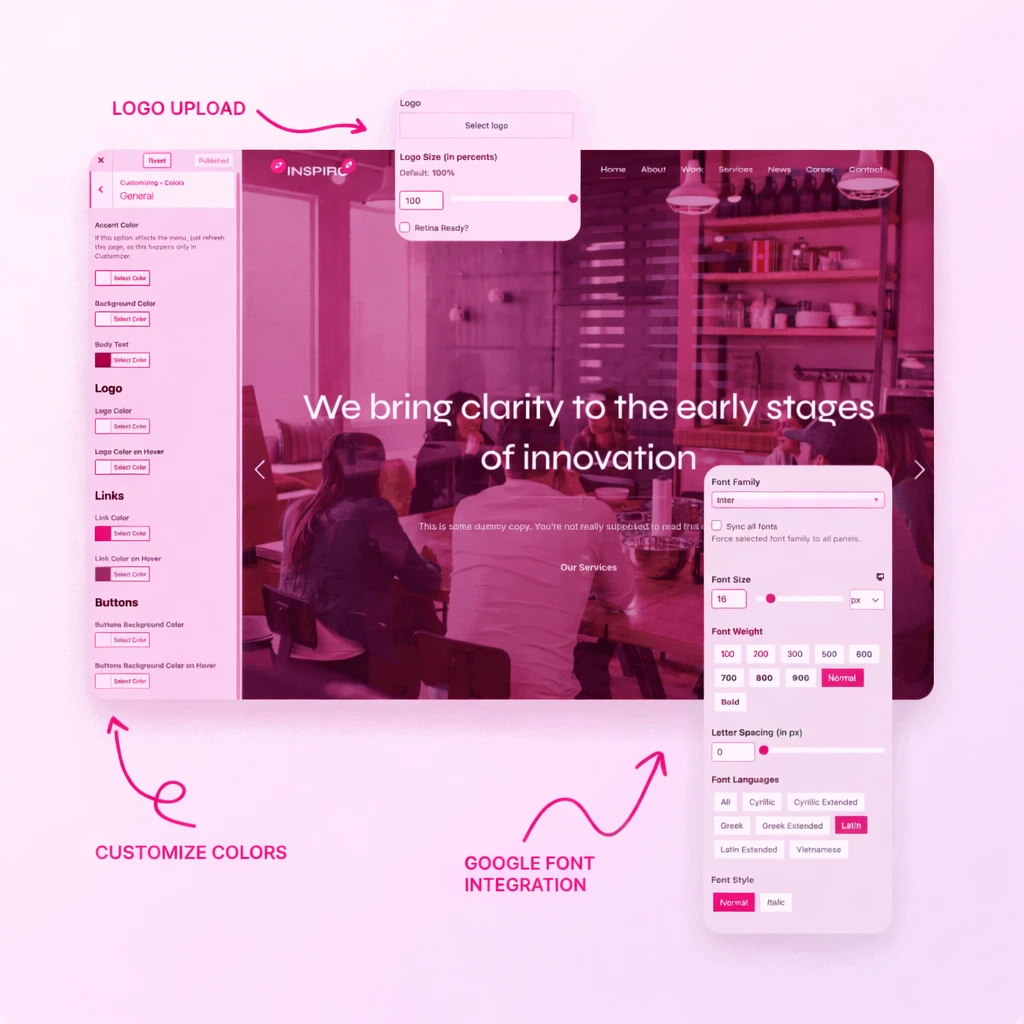
Beginner-friendly WordPress features
| Feature | Benefit |
|---|---|
| Visual editor | Easier content creation |
| Media library | Simple image and file management |
| Theme customizer / Site Editor | Adjust design without coding |
| Plugin installer | Add features with a few clicks |
| User roles | Manage team access safely |
For users who want even more design control, page builders like Elementor or other drag-and-drop tools make WordPress even easier to work with.
This means WordPress works well for two very different groups:
- people with no technical background
- developers who want full control
That combination is rare, and it is one of the reasons WordPress continues to stay ahead of many competitors.
3. WordPress Gives You Huge Customization Freedom
A big part of WordPress’s strength comes from how customizable it is.
You are not stuck with one layout or a limited design system. Instead, you can shape the site to match your brand, your audience, and your business goals.
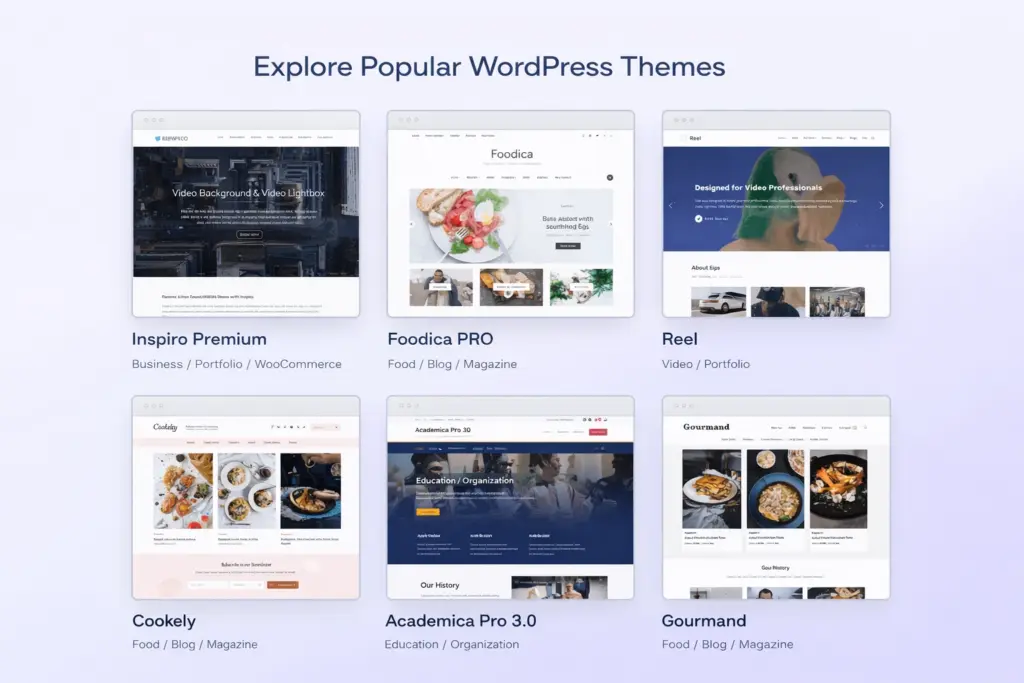
This is possible because WordPress has a massive ecosystem of themes and plugins.
Themes control how the website looks. Plugins control what the website can do.
What themes and plugins allow you to customize
| Type | What It Changes |
|---|---|
| Theme | Layout, colors, typography, visual design |
| Plugin | Features like SEO, forms, memberships, stores, speed tools |
If you need a certain kind of website, chances are there is already a WordPress theme or plugin built for it.
Examples include:
- recipe websites
- photography portfolios
- agency websites
- online shops
- event websites
- course platforms
- directories
This flexibility also means you are not forced into one rigid structure. If your needs change, you can often add new functionality later instead of rebuilding the whole site from scratch.
That makes WordPress practical not only for launching a website, but also for adapting it as your business evolves.
4. There Are Thousands of Themes and Plugins Available
One of the strongest benefits of WordPress is the size of its ecosystem.
You can find thousands of free and premium tools that help you build exactly the kind of site you want.
Common WordPress plugin categories
| Plugin Category | Example Use |
|---|---|
| SEO plugins | Improve search visibility |
| Form plugins | Create contact forms |
| Security plugins | Protect the website |
| Caching plugins | Improve speed |
| eCommerce plugins | Build online stores |
| Membership plugins | Restrict premium content |
| Social media plugins | Add feeds and sharing buttons |
Common WordPress theme types
| Theme Type | Best For |
|---|---|
| Blog themes | Writers and publishers |
| Business themes | Companies and agencies |
| Portfolio themes | Designers, photographers, creatives |
| WooCommerce themes | Online stores |
| Magazine themes | News and content-heavy sites |
This variety saves time and money. Instead of building every feature from scratch, you can often install a trusted plugin or theme and configure it to fit your needs.
It also means WordPress can fit nearly any industry.
5. WordPress Is Strong for SEO
Search engine visibility matters for almost every website. If people can’t find your pages in search results, growth becomes much harder.
WordPress has long been considered an SEO-friendly platform because it gives websites a solid technical foundation.
It generates clean URLs, supports proper heading structures, works well with SEO plugins, and makes content publishing simple and consistent.
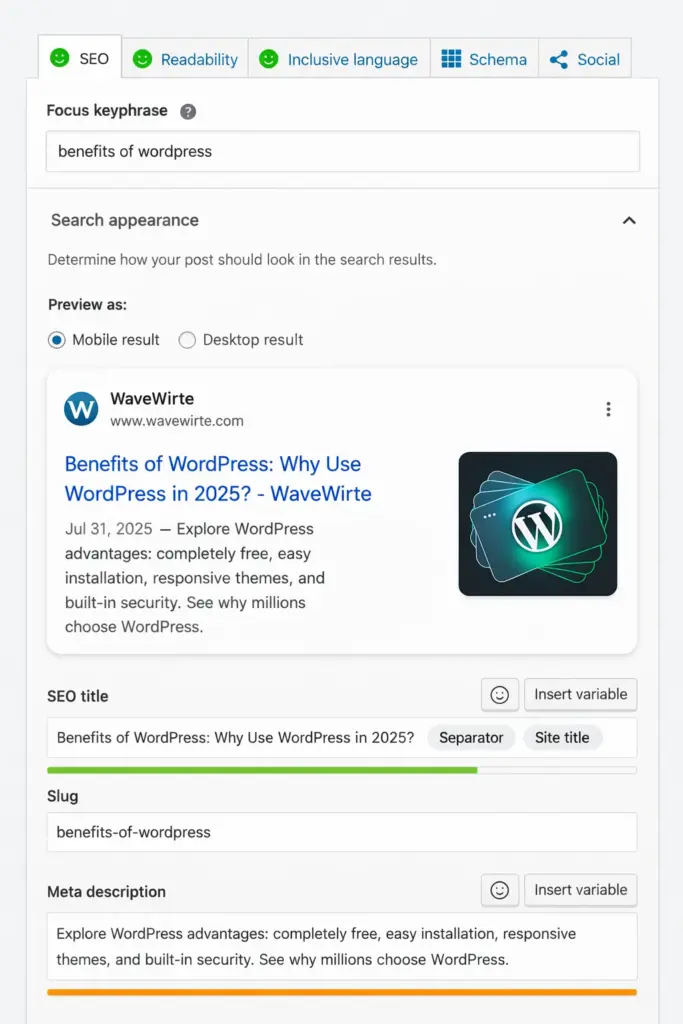
SEO-friendly advantages of WordPress
| SEO Feature | Why It Helps |
|---|---|
| Clean permalink structure | Better URLs for users and search engines |
| Easy content publishing | Supports regular updates and blogging |
| SEO plugins | Add meta tags, sitemaps, schema, and analysis |
| Mobile-friendly themes | Supports page experience signals |
| Fast theme and plugin options | Helps performance and Core Web Vitals |
Plugins like Yoast SEO, Rank Math, and others can further improve optimization by helping with:
- meta titles
- meta descriptions
- XML sitemaps
- structured data
- content analysis
- social previews
Another reason WordPress works well for SEO is that it makes blogging easy. Regular, useful content is one of the best ways to grow search traffic, and WordPress is still one of the best platforms for publishing content consistently.
6. It Works Well on Mobile Devices
Today, a large portion of website traffic comes from smartphones and tablets. A website that only looks good on desktop is no longer enough.
Most modern WordPress themes are built with responsive design, which means they automatically adapt to different screen sizes.
This is important not only for user experience, but also for search rankings. Google strongly favors mobile-friendly websites.
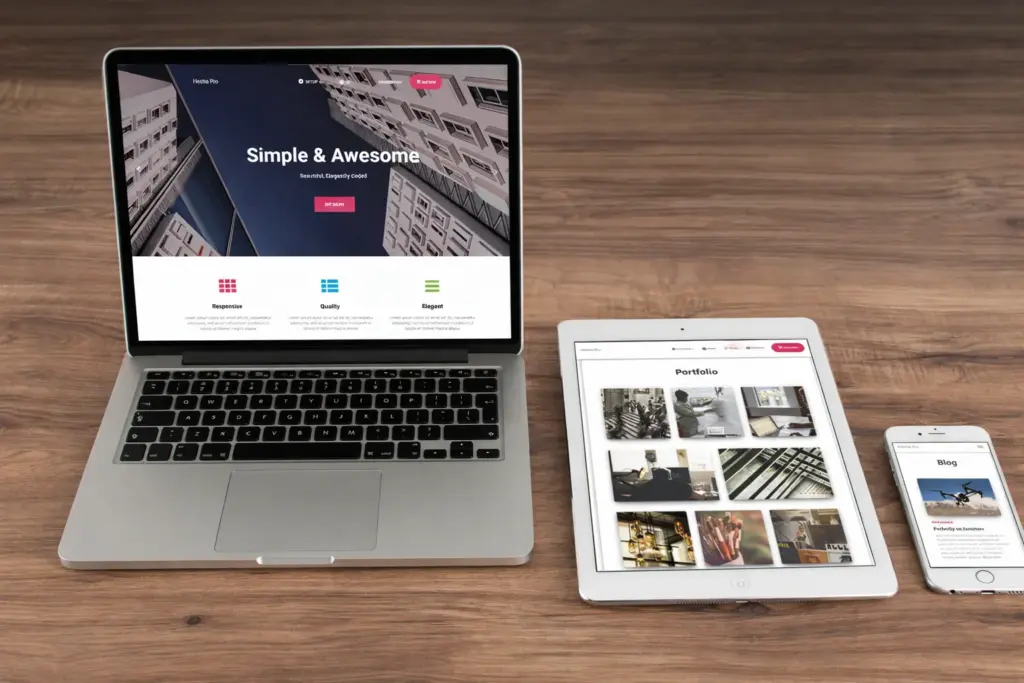
Why mobile responsiveness matters
| Mobile Factor | Impact |
|---|---|
| Easier reading | Visitors stay longer |
| Better navigation | Lower bounce rate |
| Improved Google signals | Better SEO performance |
| Faster mobile experience | Stronger Core Web Vitals |
Good WordPress themes also allow you to preview mobile layouts while editing, which helps ensure your content remains readable and attractive across devices.
For blogs, business sites, and stores, this is no longer optional. It is a basic requirement.
7. WordPress Can Grow With Your Business
Some website platforms work fine at the beginning but become limiting as your needs increase. WordPress is different because it can scale.
You might start with a simple five-page website today and later add:
- a blog
- a store
- booking forms
- premium content
- customer accounts
- multilingual functionality
In many cases, you can do that without rebuilding the site from scratch.
Examples of how WordPress scales
| Starting Website | Later Growth Possibility |
|---|---|
| Personal blog | Membership site or course platform |
| Small business site | Full eCommerce store |
| Portfolio | Agency website with service pages |
| News blog | Magazine with categories and contributors |
This long-term flexibility is one of WordPress’s biggest advantages. It allows you to invest in one platform and keep building on it instead of jumping to another system later.
That’s also why many large brands and publishers continue to rely on WordPress. It can handle simple websites, but it can also support far more complex projects when needed.
8. WordPress Offers Strong Security Potential
No website platform is automatically perfect when it comes to security. But WordPress gives you the tools and flexibility needed to build a secure website when managed properly.
The WordPress core platform receives regular updates, including security patches. Good themes and plugins also release updates to fix bugs and improve protection.
On top of that, you can strengthen your site further using security plugins, backups, login protection, and good hosting.
Basic WordPress security essentials
| Security Measure | Why It Helps |
|---|---|
| Regular updates | Fixes vulnerabilities |
| Strong passwords | Reduces account takeover risk |
| Security plugin | Adds firewall and malware scanning |
| SSL certificate | Encrypts traffic |
| Backup system | Helps recovery if something goes wrong |
Because WordPress is so widely used, security best practices are well documented. That means site owners can usually find clear guidance, tools, and support for securing their websites properly.
In other words, WordPress can be very secure, but it rewards good maintenance.
9. It Has a Massive Global Community
Another major benefit of WordPress is its community.
Because millions of people use it, you are never alone when you need help. Whether you run into a technical issue, need plugin recommendations, or want to learn how to customize something, there is almost always a tutorial, forum discussion, or guide available.
Types of WordPress support resources
| Resource Type | What You’ll Find |
|---|---|
| Official documentation | Core WordPress help |
| Blogs and tutorials | Step-by-step guides |
| Community forums | Troubleshooting and advice |
| YouTube tutorials | Visual learning |
| Theme/plugin support teams | Product-specific help |
This large ecosystem makes WordPress easier to learn than many people expect. Even beginners can usually find answers quickly because so many others have already solved similar problems.
For businesses, this also means less dependence on one developer or one company. WordPress knowledge is widespread, which gives you more flexibility when hiring help.
10. You Have More Ownership and Control
One of the most overlooked reasons to choose WordPress is control.
With WordPress, especially the self-hosted version, you control your website more directly than with many closed website builders.
You can choose:
- your hosting provider
- your theme
- your plugins
- your SEO tools
- your monetization strategy
- your backup system
You are not locked into one company’s limited feature set or pricing structure.
Why control matters
| Area | WordPress Advantage |
|---|---|
| Hosting choice | Move providers when needed |
| Design freedom | Choose or change themes freely |
| Features | Add plugins based on your goals |
| Monetization | Ads, affiliate marketing, memberships, products |
| Content ownership | Greater long-term flexibility |
For site owners who want room to grow without being boxed in, this is a major advantage.
Typical WordPress Costs in 2026
To understand the practical value of WordPress, it helps to look at what a typical website might cost.
Estimated WordPress website budget
| Website Type | Estimated Yearly Cost |
|---|---|
| Basic blog | $50–$150/year |
| Small business website | $100–$300/year |
| Professional content site | $200–$600/year |
| WooCommerce store | $300–$1000+/year depending on features |
The wide range comes from how flexible WordPress is. You can keep things simple and low-cost, or invest more in premium tools if your business requires them.
That flexibility is a big reason why WordPress works for both small personal projects and serious commercial websites.
Is WordPress Still Worth Using in 2026?
Yes, and for many people it remains one of the best options available.
It continues to offer something that many website platforms struggle to balance: ease of use and deep flexibility at the same time.
It is not perfect for every possible project, and some people may prefer simpler all-in-one builders for very basic websites. But for anyone who wants room to grow, real customization, strong SEO potential, and better long-term control, WordPress is still one of the strongest choices.
Final Thoughts
WordPress continues to lead because it solves real problems for website owners.
It is affordable, flexible, beginner-friendly, customizable, and powerful enough to support serious online growth. You can start small, keep costs under control, and expand your site over time without switching platforms.
To summarize, the main benefits of WordPress in 2026 include:
- low starting cost
- easy content management
- huge theme and plugin ecosystem
- strong SEO support
- responsive mobile design
- scalability for growing websites
- strong community and support
- better ownership and control
If you want a platform that gives you both freedom and long-term potential, WordPress is still one of the smartest website choices you can make.