
Follow Me On Social Media!



Spam comments are one of the most common problems WordPress site owners deal with. They show up in blog posts, pages, and forms, usually filled with random promotions, fake messages, and suspicious links. Left unchecked, they can make your website look neglected, reduce trust, and create a poor experience for real visitors.
For some websites, spam comments are just annoying. For others, they become a serious maintenance problem that wastes time and hurts credibility.
The good news is that WordPress gives you several ways to reduce or completely stop comment spam. Some solutions are built into WordPress itself, while others involve plugins, CAPTCHA tools, firewalls, or small technical changes that quietly block bots before they ever post.
In this guide, you’ll learn seven reliable ways to stop spam comments on WordPress, along with a few extra tips for stronger long-term protection.
Table of Contents
Why Spam Comments Are a Bigger Problem Than They Seem
A few spammy messages may not feel like a major issue at first, but over time they can damage your site in several ways.
Spam comments often include low-quality backlinks, fake names, irrelevant text, and promotional offers that have nothing to do with your content. When visitors see these messages, it makes your site feel poorly maintained. That hurts trust immediately.
They can also cause practical problems behind the scenes. If you get large amounts of spam, your moderation queue becomes harder to manage, your database fills with junk, and your inbox gets flooded with notifications you do not need.
Here’s a quick look at the impact:
| Problem | How It Hurts Your Website |
|---|---|
| Poor credibility | Makes your site look unprofessional |
| Bad user experience | Real visitors avoid engaging |
| Time wasted | You spend too much time deleting junk |
| SEO risk | Low-quality comment sections can weaken page quality signals |
| Security concerns | Spam comments may include malicious or deceptive links |
That is why spam prevention should not be treated as a minor cleanup task. It is part of keeping your website secure, trustworthy, and easy to manage.
1. Use WordPress’s Built-In Discussion Settings
Before installing any plugin, start with the tools WordPress already provides. The built-in discussion settings are simple, effective, and often enough to reduce a large percentage of spam right away.
Go to:
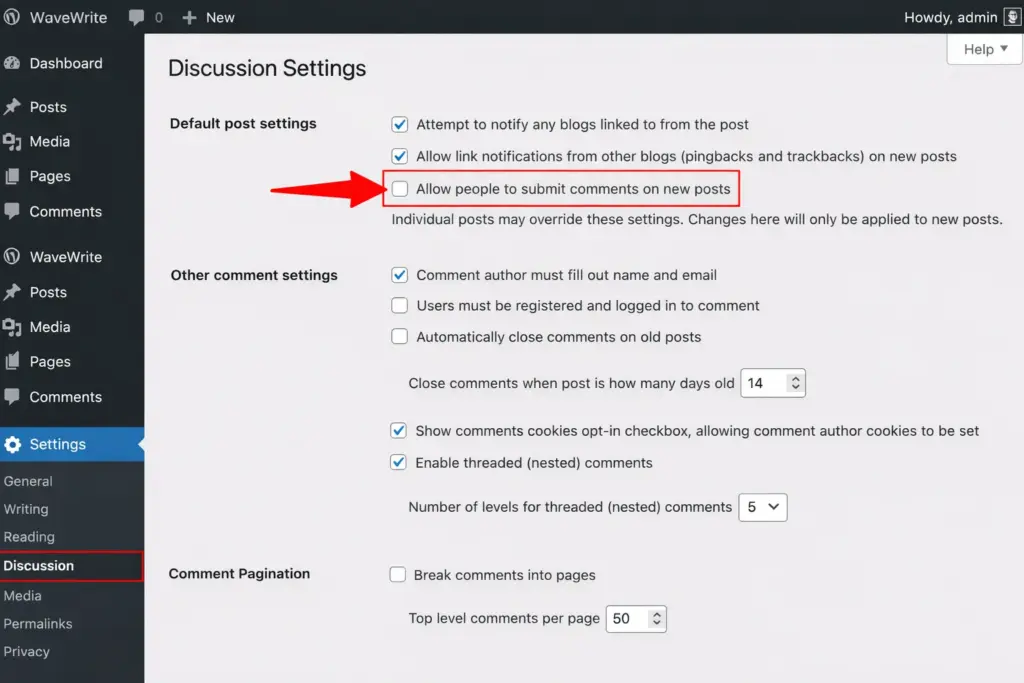
Settings → Discussion
From there, you can adjust several important options.
Disable Comments on New Posts
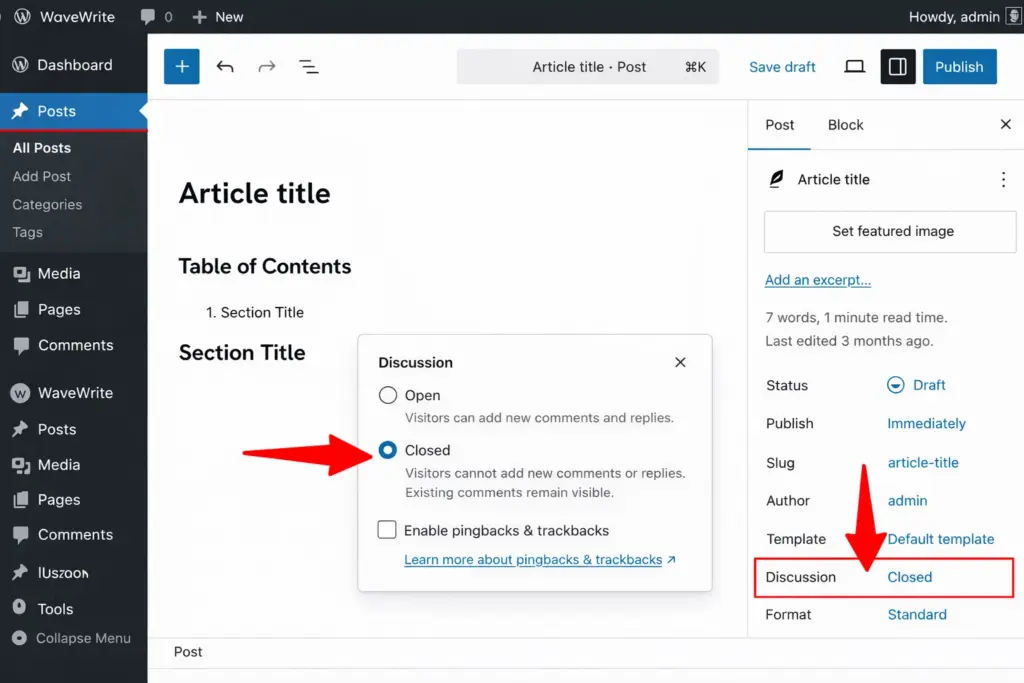
If your website does not really need comments, the easiest solution is to turn them off completely.
This works especially well for:
- business websites
- company service pages
- portfolio sites
- landing pages
- brochure-style websites
To disable comments on future posts, uncheck:
Allow people to submit comments on new posts
This setting only affects new content. Existing posts may still allow comments unless you update them separately.
Require Users to Be Logged In Before Commenting
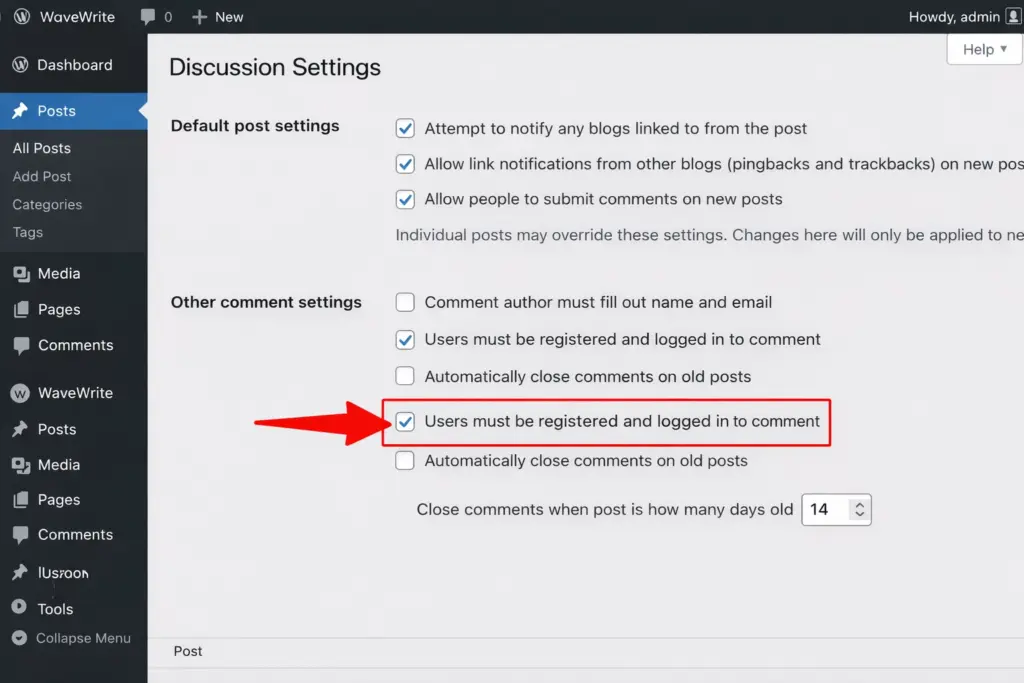
Another useful setting is requiring commenters to register and log in first.
This creates friction for bots and low-quality spam attempts because anonymous commenting becomes impossible.
Enable:
Users must be registered and logged in to comment
This option works well on community sites or membership-based websites, but it may reduce comment activity on regular blogs because some real visitors do not want to create accounts just to leave a quick message.
Turn On Manual Comment Approval
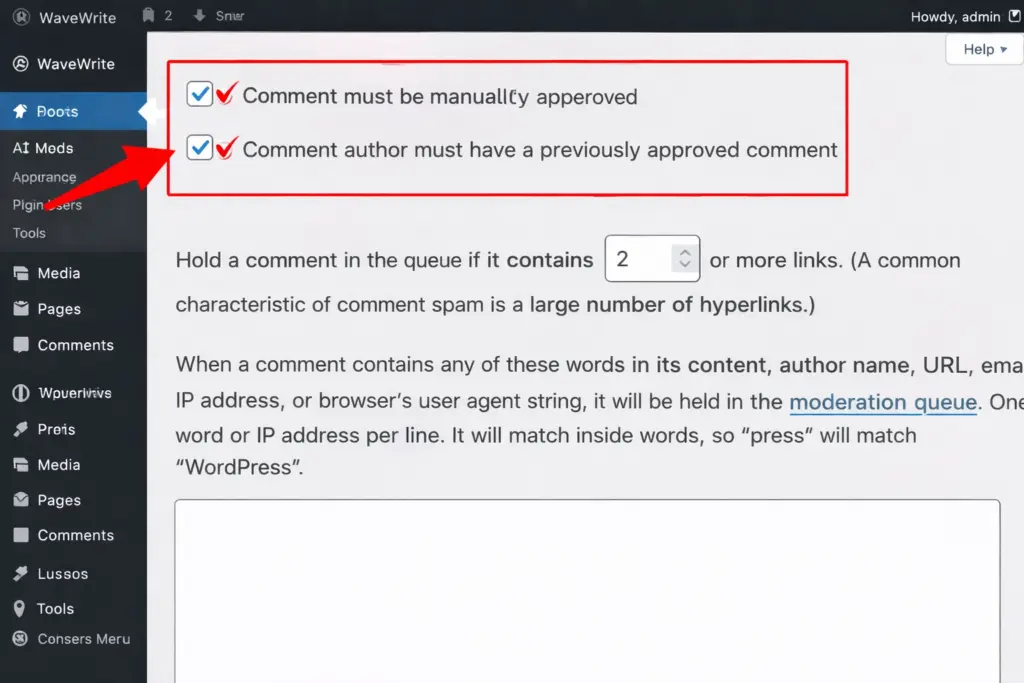
If you want full control over what gets published, enable moderation.
In the same discussion settings area, you can require comments to be approved before they appear publicly.
This lets you review comments manually and stop spam before it shows up on your site.
You can also choose a lighter option:
Comment author must have a previously approved comment
This means trusted repeat commenters can post more easily, while new commenters still go through moderation first.
Limit the Number of Links Allowed in a Comment
Spam comments often contain multiple links. WordPress lets you flag comments for moderation if they include too many.
In the moderation settings, you can choose how many links trigger review.
A practical setup is:
- 1 link if you want strict control
- 2 links if you want to be slightly more flexible
This one setting alone can catch a lot of obvious spam.
Create a Keyword Blocklist
WordPress also allows you to filter comments based on specific words, phrases, IPs, email addresses, or URLs.
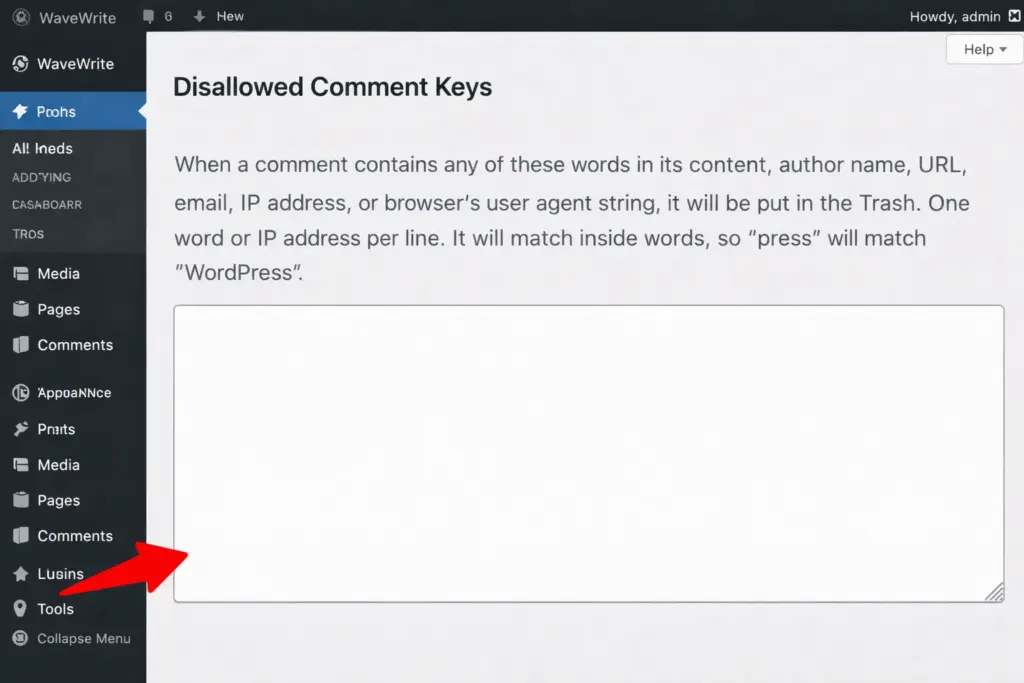
You can use this to block common spam terms like:
- buy now
- cheap
- free money
- discount offer
- work from home
Be careful not to overdo it. If you block words that real users might naturally use, you may accidentally filter good comments too.
A safer approach is to send suspicious comments to moderation instead of deleting them automatically.
Disable Trackbacks and Pingbacks
Trackbacks and pingbacks were meant to notify websites when they were linked from another blog. In practice, they are often abused by spammers.
If you do not specifically use them, it is usually best to disable them.
In the discussion settings, uncheck the options related to link notifications and pingbacks.
This removes one more common path for spam.
2. Install a Dedicated Anti-Spam Plugin
If built-in settings are not enough, the next step is to use an anti-spam plugin. These tools automatically analyze comments and block suspicious activity before it reaches your moderation queue.
For most WordPress websites, this is one of the most effective long-term solutions.
Akismet
Akismet is one of the best-known anti-spam tools in the WordPress ecosystem. It comes pre-installed on many WordPress sites and works by comparing comments against a large spam database.
It is especially useful because it runs quietly in the background and requires very little manual work once configured.
Best for:
- blogs
- business sites
- sites with active comment sections
CleanTalk
CleanTalk protects comments, contact forms, registrations, and more. It is designed to stop spam across the whole website, not just the comments area.
A major benefit is that it works without forcing users through CAPTCHA challenges, which helps preserve a smoother user experience.
Antispam Bee
Antispam Bee is a good option for users who want a free tool with privacy-friendly features. It handles spam locally and offers flexible filtering options.
Here is a simple comparison:
| Plugin | Best For | Main Advantage |
|---|---|---|
| Akismet | Most WordPress sites | Strong spam detection with minimal setup |
| CleanTalk | Full-site spam protection | Covers comments, forms, and registrations |
| Antispam Bee | Privacy-focused users | Free and lightweight |
A good anti-spam plugin can reduce manual moderation dramatically.
3. Add CAPTCHA or Bot Verification to the Comment Form
CAPTCHA tools help separate real users from bots. They add a verification layer to your comment form, making it much harder for automated scripts to post spam.
This can be especially useful if your website is getting constant bot attacks.
Google reCAPTCHA
Google reCAPTCHA is widely used and effective. Depending on the version you choose, it may work invisibly in the background or show a checkbox challenge.
hCaptcha
hCaptcha is a privacy-focused alternative that many site owners prefer, especially when they want an option less tied to Google services.
Cloudflare Turnstile
Turnstile is one of the smoothest options from a user experience standpoint. It focuses on invisible verification, meaning real visitors usually do not need to click or solve anything.
Here is a quick overview:
| Tool | User Experience | Notes |
|---|---|---|
| reCAPTCHA | Good | Popular and reliable |
| hCaptcha | Good | Stronger privacy appeal |
| Cloudflare Turnstile | Excellent | Very low friction for users |
If you care a lot about keeping the comment process easy, invisible verification tools are often the best fit.
4. Use a Web Application Firewall (WAF)
A firewall can stop spam before it even reaches WordPress.
This is different from comment moderation or plugins that inspect submissions after they arrive. A web application firewall filters traffic earlier and blocks suspicious visitors, known bad bots, and abusive patterns at the edge or server level.
Cloudflare
Cloudflare is one of the most popular options. It can block malicious traffic before it even touches your hosting server, which helps with spam, security, and performance at the same time.
Wordfence
Wordfence works inside WordPress and gives you a lot of control over blocking rules, login protection, and suspicious behavior monitoring.
A firewall is especially useful for:
- high-traffic websites
- websites getting repeated bot attacks
- websites already using security tools seriously
If spam is persistent and happening at scale, a WAF can make a noticeable difference.
5. Remove the Website URL Field from the Comment Form
A large percentage of spam comments exist for one reason: link building.
Spammers often fill in the website field in the comment form so they can drop backlinks to their own sites. If you remove that field, you reduce the incentive for many spam attempts.
Most legitimate users do not need to leave their website URL when posting a comment. For that reason, removing this field is often a smart and low-impact change.
This method works well when:
- you want to keep comments open
- you do not need commenter websites displayed
- you want fewer self-promotional submissions
It will not stop every spam comment, but it can noticeably reduce low-quality ones.
6. Add a Honeypot Field for Invisible Spam Protection
A honeypot is a hidden form field that normal visitors cannot see. Real users do not fill it out because it is invisible. Bots, however, often try to complete every field they detect.
When a bot fills in the hidden honeypot field, the comment is automatically flagged as spam.
This method is useful because:
- it works silently
- it does not interrupt real users
- it blocks many simple bots automatically
Honeypots are often built into anti-spam plugins or security plugins, and they are one of the least intrusive ways to improve spam protection.
They work best when combined with other methods rather than used alone.
7. Consider an Alternative Comment System
If native WordPress comments are becoming too difficult to manage, you may want to use a third-party comment platform instead.
Services like Disqus and similar systems handle comment moderation externally and often include strong anti-spam filters by default.
This can reduce your workload, but there are trade-offs.
Advantages
- strong spam filtering
- centralized moderation
- social login support
- easier management on some sites
Drawbacks
- reliance on a third-party service
- less control over data and design
- possible performance impact from external scripts
- comments may be less valuable for on-site SEO
This route makes more sense for websites that still want discussion features but do not want to manage native WordPress comment moderation directly.
A Smart Setup for Most WordPress Sites
Not every site needs every anti-spam method. The best setup depends on how active your comments are and how serious your spam problem has become.
For most WordPress blogs and business sites, a practical combination looks like this:
| Level | Recommended Setup |
|---|---|
| Basic | Built-in moderation + disabled pingbacks |
| Better | Add anti-spam plugin + link limits |
| Strong | Add CAPTCHA or Turnstile + anti-spam plugin |
| Advanced | Add firewall + honeypot + stricter moderation |
A layered approach usually works best. Instead of relying on just one tool, combine a few lightweight protections so spam gets blocked at multiple points.
Extra Tips to Keep Comment Spam Under Control
Beyond the main methods above, a few simple habits can help keep your site cleaner over time.
Close Comments on Older Posts
Older posts often attract spam because they stay online for years and may no longer get real engagement. WordPress lets you automatically close comments after a certain number of days.
This is a smart option for blogs where older posts rarely receive useful discussion.
Moderate First-Time Commenters Carefully
If you allow open commenting, keep stricter controls on first-time users. Once someone has been approved and shown they are legitimate, you can relax the process slightly.
Keep WordPress and Plugins Updated
Outdated sites are more vulnerable to abuse, including spam and bot exploitation. Regular updates improve both security and compatibility with anti-spam tools.
Monitor Patterns
If you notice spam coming from a certain country, keyword type, or traffic pattern, you can strengthen your settings accordingly using blocklists, firewalls, or plugin rules.
Final Thoughts
Stopping spam comments on WordPress is not about using one magic fix. In most cases, the best results come from combining a few solid protections that match your site’s needs.
If your website does not depend on comments, disabling them may be the easiest solution. If comments matter to your audience, then using moderation settings, anti-spam plugins, CAPTCHA tools, and firewalls can help you keep discussions clean without creating too much friction for real visitors.
The goal is simple: make it easy for genuine people to engage, and difficult for bots and spammers to get through.
Once you put the right protections in place, comment moderation becomes much easier, your website looks more professional, and your visitors can focus on real conversation instead of junk content.