
Follow Me On Social Media!



Why Bing Webmaster Tools Deserves Way More Credit Than It Gets
hear me out. I know what you’re thinking — “Bing? Really?” Yes, really.
Look, we’re all obsessed with Google. But while you’ve been busy chasing those coveted first-page rankings, Bing has been quietly sending real, valuable traffic to websites — especially in the US, Canada, and Australia, where a huge chunk of desktop users (and basically every corporate employee stuck on a Windows machine) are using Microsoft’s search engine whether they chose to or not.
But here’s the part that actually made me sit up and pay attention: Bing is literally what powers Microsoft’s Copilot AI. You know, the AI assistant that’s being baked into Windows, Office, and everywhere else? Yeah — it pulls its answers directly from Bing’s index. So if you’re not well-indexed on Bing, you’re invisible to Copilot too. That’s a big deal.
This whole approach — optimizing for AI-generated answers, not just traditional search results — is called Generative Engine Optimization (GEO), and honestly, it’s where the smart money is right now.
So let’s walk through exactly how to set up and get the most out of Bing Webmaster Tools, step by step. No fluff, I promise.
Table of Contents
Step 1: Skip the Boring Setup — Just Import from Google
Here’s the thing nobody tells you about Bing Webmaster Tools: you don’t have to do half the work people assume you do.
Most people hear “webmaster tool verification” and immediately feel a headache coming on. DNS records? HTML files? Meta tags in the <head>? No thanks. But Bing has this genuinely great shortcut — you can just import everything straight from Google Search Console.
Yep. If you’re already set up in GSC (and you should be!), Bing can pull your verified domains AND your sitemaps automatically. Here’s all you do:
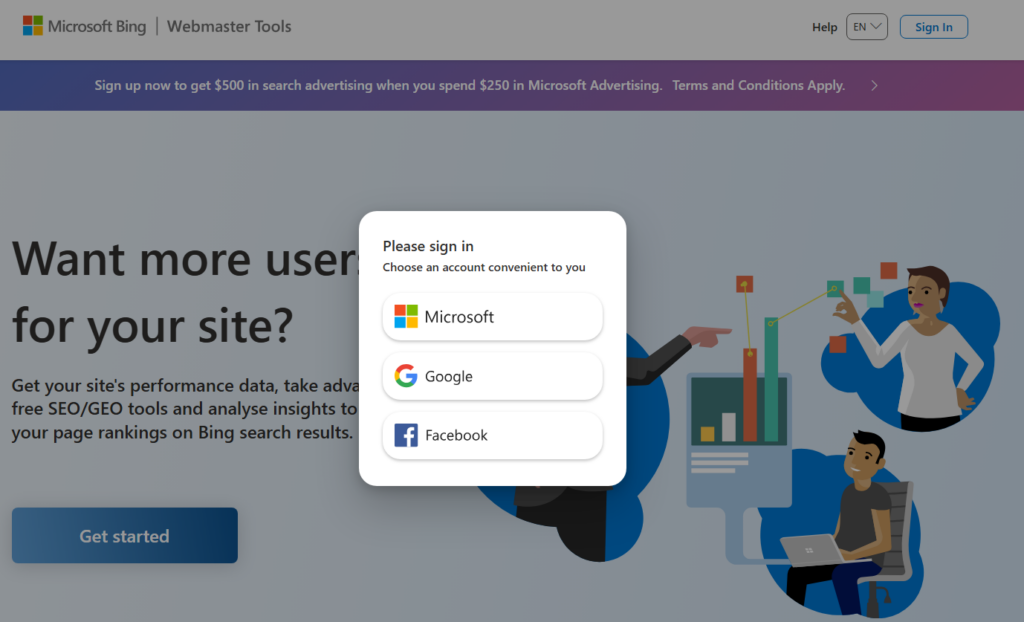
- Head to Bing Webmaster Tools and hit Sign In.
- Choose Sign in with Google — use the same Gmail linked to your Search Console.
- You’ll see an option to Import from Google Search Console. Click it.
- Pick your properties from the list.
- Done. Seriously, that’s it. Your sites show up verified within minutes.
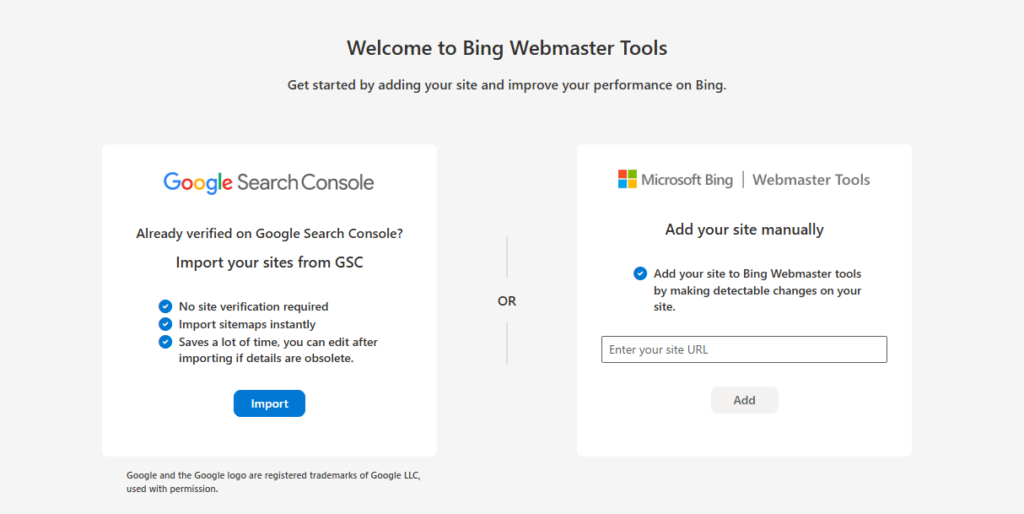
It’s honestly one of those rare moments in SEO where something is actually as easy as it sounds. Your domains are verified, your sitemaps are synced, and both platforms are working from the same data. Clean and consistent.
Quick heads-up: If your GSC sitemap is still on HTTP (not HTTPS), swap it to HTTPS after the import. Bing’s crawler is picky about that, and so are AI indexers. It’s a tiny fix that matters.
Step 2: Don’t Sleep on Your Sitemaps
Once you’re in, the next thing to nail is your sitemap setup. Think of your sitemap like giving Bing a really detailed map of your website — the better the map, the more confidently it can explore every corner of your content.
Always Use the Full URL
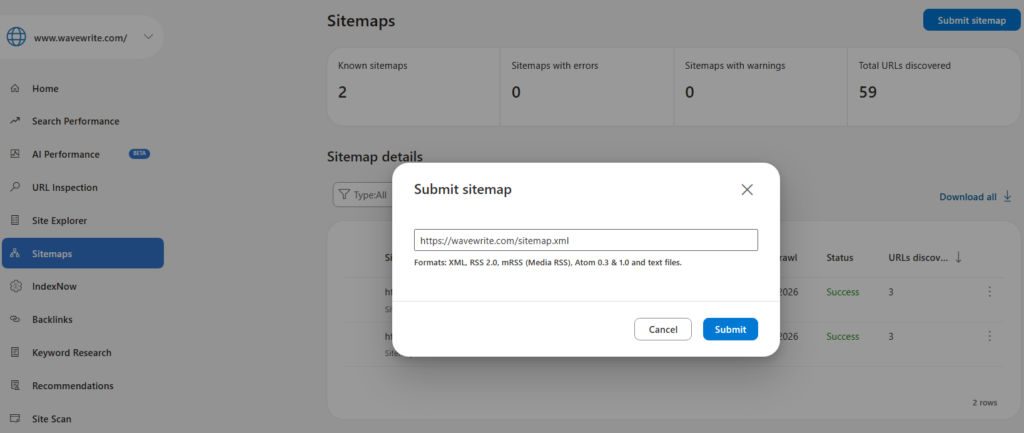
When you submit a sitemap, use the whole thing:
https://www.bing.com/webmasters/sitemaps?siteUrl=
https://yourdomain.com/sitemap.xml
Not a relative path, not a shortcut. The full URL. Bing’s crawler gets confused with partials and you’ll end up with pages that never get found. Don’t let that happen.
What Do Those Status Labels Actually Mean?
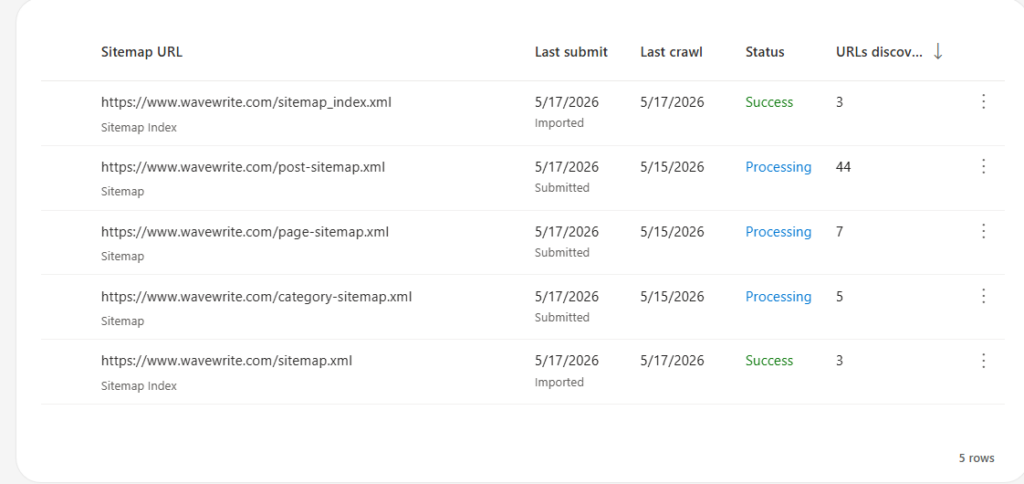
After you submit, Bing shows a status for each sitemap. Here’s the plain-English version:
| Status | What’s Actually Happening |
|---|---|
| Pending | Bing’s got it, just hasn’t looked at it yet. Chill. |
| Processing | Crawler’s on it right now. Normal. |
| Success | Sitemap was read properly. You’re good. |
| Error | Something’s broken — usually a bad URL or messy XML. Go fix it. |
One thing worth knowing: Success doesn’t mean your pages are indexed yet — it just means Bing could read the sitemap. Indexing happens after crawling. Think of it like Bing saying “got your list, will visit soon.”
Submit Multiple Sitemaps — Seriously, It Helps
If you’re on WordPress with Rank Math or Yoast, you probably already have separate sitemaps for different content types. Submit them all:
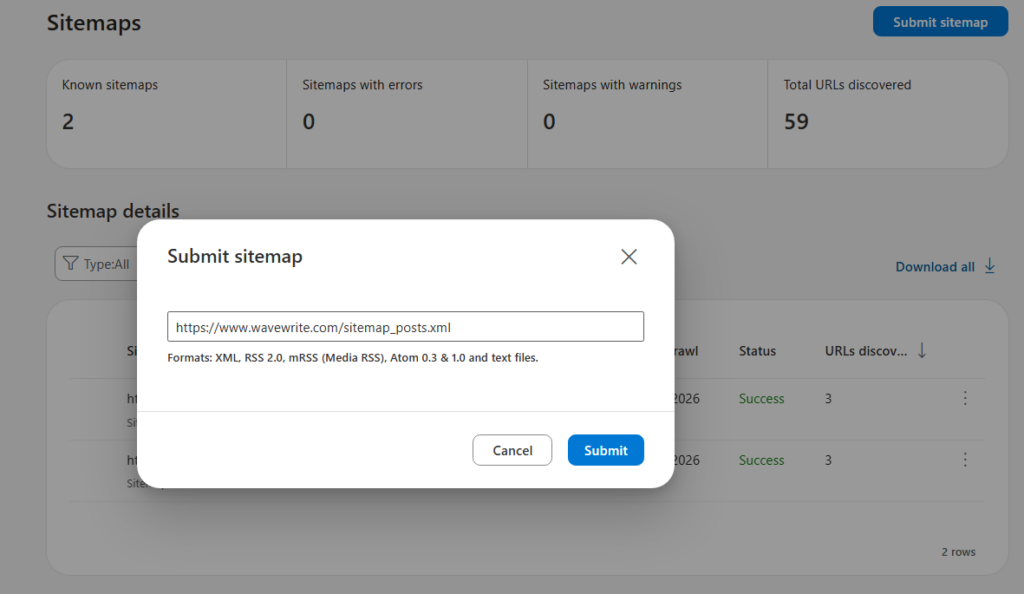
sitemap_posts.xml— your blog postssitemap_pages.xml— your static pagessitemap_categories.xml— category pagessitemap_products.xml— if you’ve got an online store
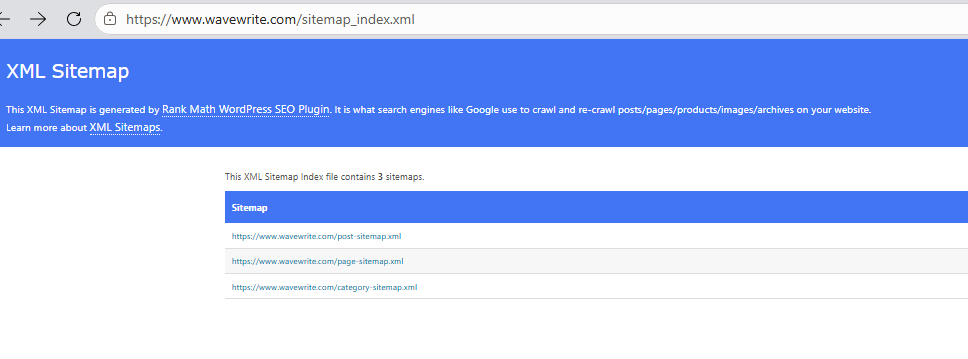
Why bother? Because it tells Bing (and AI engines like Copilot) exactly what kind of site you’re running and what you’re an authority on. It’s like organizing your bookshelf — way easier to find things when everything isn’t just thrown in one pile.
Robots.txt: Make Sure You’re Not Accidentally Hiding From Bing
Bing Webmaster Tools has a built-in Robots.txt Tester, which is genuinely handy. Use it to make sure you’re not accidentally blocking your best content from BingBot. You’d be surprised how many sites have this problem and have no idea. Check that your important pages are open for crawling, and block the junk you don’t need indexed (admin pages, checkout pages, that kind of thing).
Step 3: Stop Waiting for Bing to Find Your Content — Tell It Directly
Here’s where things get fun. You don’t have to sit around hoping Bing will eventually crawl your new post. You can just… tell it.
Run a Quick Health Check First
Before you request indexing on any page, do yourself a favor and run a Live URL Test in the URL Inspection tool. It takes 30 seconds and tells you if your page is actually indexable or if there’s something quietly broken in the background — missing meta tags, crawl errors, structured data issues, whatever. Fix those first, then request indexing.
Trying to index a broken page is like mailing a letter with the wrong address. You can send it as many times as you want; it’s still not getting there.
Hit the “Request Indexing” Button for Important Pages
Once your page passes the health check, click Request Indexing. This basically jumps your page to the front of the crawl queue. Super useful for:
- New blog posts (especially anything time-sensitive)
- Product pages with updated prices or stock
- Pages where you just fixed a technical error
- Anything you want Copilot to potentially cite ASAP
Just know there’s a daily limit on these requests (somewhere between 10 and 50 depending on your site’s standing), so be a bit strategic about which pages you prioritize.
The Real Power Move: Automate It with Rank Math
Okay, this is my favorite part of the whole setup. If you’re on WordPress and using Rank Math (which honestly you should be), there’s a feature called Instant Indexing that completely removes the manual step.
Here’s how it works: you connect Rank Math to Bing via the IndexNow API, and from that point on, every time you publish or update a page, Rank Math automatically pings Bing in real time. Bing gets a 200 OK back within seconds, and your content can show up in the index within minutes instead of days.
Setting it up takes about two minutes:
- Go to Rank Math > General Settings > Instant Indexing in your WordPress dashboard.
- Turn on Bing IndexNow.
- Generate your API key — Rank Math does this automatically.
- Confirm the key in Bing Webmaster Tools under Settings > API Access.
That’s it. You’re now automatically telling Bing every time something changes on your site. For GEO, this is gold — Copilot and AI engines love fresh, frequently updated content. Sites that stay active get treated as more trustworthy sources. It’s like the difference between a news site and a dusty old blog nobody’s touched since 2019.
Step 4: Run a Technical Audit (Your AI Visibility Depends on It)
Getting indexed is just the first step. If you actually want to show up in Copilot’s AI-generated answers, your pages need to be squeaky clean technically. Here’s what to look for when you run that Live URL Test:
No meta description? Fix it. AI engines need a clean, clear summary to pull from. Keep it between 120-160 characters and make it actually descriptive.
Canonical tag conflicts? That’s where two versions of your page are fighting for authority. Sort it out before requesting indexing.
Structured data errors? This one’s big. Schema markup (FAQ, Article, Product, Breadcrumb) is how AI engines understand what your content is actually about. Errors here are basically like handing in a report with half the pages missing.
Blocked resources? If your JavaScript or CSS files are blocked in robots.txt, Bing can’t fully render your page. An unrendered page is pretty much invisible to AI — it’s like trying to describe a painting you can’t see.
Keep Your URLs Clean and Logical
This sounds boring, but AI engines genuinely care about this. A nice, organized URL structure like:
yourdomain.com/blog/post-titleyourdomain.com/shop/category/product
…tells both search engines and AI systems exactly how your content is organized. Messy, flat URL structures are confusing and hurt your chances of being seen as an authoritative source.
What Makes AI Engines Actually Trust You?
Beyond the technical stuff, AI engines are basically asking: “Should I stake my reputation on citing this site?” Here’s what tips them in your favor:
- You update your content regularly — that IndexNow setup is doing a lot of work here.
- Your site doesn’t throw errors — consistent 200 OK responses say “I’m reliable.”
- Your pages are actually thorough — thin, 200-word pages don’t get cited. Write real, useful content.
- Reputable sites link to you — yes, backlinks still matter, even in the age of AI.
Step 5: Check In Regularly (15 Minutes a Week, That’s All)
Bing Webmaster Tools isn’t something you set up and forget. But the good news is it doesn’t need much attention — a quick weekly check covers you:
Every week: Scan the dashboard for new crawl errors, indexing drops, or sitemap issues. Catching something early saves you weeks of invisible pages.
Every month: Pop into the Search Performance section and see which keywords are driving Bing traffic. You might find some surprising wins — keywords where you rank well on Bing but nowhere on Google. Those are hidden opportunities just waiting to be doubled down on.
And whenever you do a major site restructure — new URL structure, new categories, new product lines — revisit your sitemaps. Remove the old ones, submit the new ones, and make sure they all come back with a Success status within 48 hours.
The Bottom Line: Don’t Let Bing Be Your Blind Spot
Look, I’m not saying abandon your Google strategy. Obviously don’t do that. But ignoring Bing in 2025 is genuinely leaving traffic on the table — especially in high-value English-speaking markets. And with Copilot pulling answers straight from Bing’s index, the stakes are only going up.
The best part? Getting set up in Bing Webmaster Tools takes maybe an hour if you use the Google import shortcut. Automating it with Rank Math’s IndexNow takes another two minutes. After that, it mostly runs itself.
So yeah — give Bing some love. Future you (and Copilot) will thank you for it.
Your Bing Webmaster Tools To-Do List
- Sign in and import your domain from Google Search Console
- Submit all your sitemaps with full HTTPS URLs
- Make sure all sitemaps hit Success status
- Test your robots.txt to confirm nothing important is blocked
- Run a Live URL Test on your top pages
- Request manual indexing for your newest and most important content
- Set up Rank Math IndexNow for automated real-time indexing
- Fix any meta description, canonical, or structured data errors
- Set a weekly reminder to check your dashboard
- Review Search Performance monthly and compare with your GSC data
Maybe Can Help you
Why Your Website Is Not Ranking on Google (And How to Fix It) – WaveWrite
WordPress Low Competition Keywords: Here’s How to Actually Find Them in 2026 – WaveWrite