
Follow Me On Social Media!



Publishing a blog post is only part of the job. If Google does not discover, crawl, and index that post quickly, it cannot appear in search results, which means it cannot bring in organic traffic, leads, or sales.
That is why fast indexing matters so much. The sooner Google adds your content to its index, the sooner your article can start showing up for relevant searches.
The problem is that indexing is not always immediate. Some posts get picked up within hours, while others sit unnoticed for days or even weeks. That delay can slow down your SEO momentum, especially when you are publishing timely content or updating important pages.
In this guide, you’ll learn what blog indexing actually means, why some pages get indexed faster than others, and the most effective ways to help Google discover your posts sooner.
Table of Contents
What Google Indexing Actually Means
Google’s index is essentially a massive database of web pages that the search engine has found, processed, and stored. When someone searches on Google, the results come from this index.
If your blog post is not in the index, it cannot rank in search results.
Before a page gets indexed, Google typically moves through a few stages:
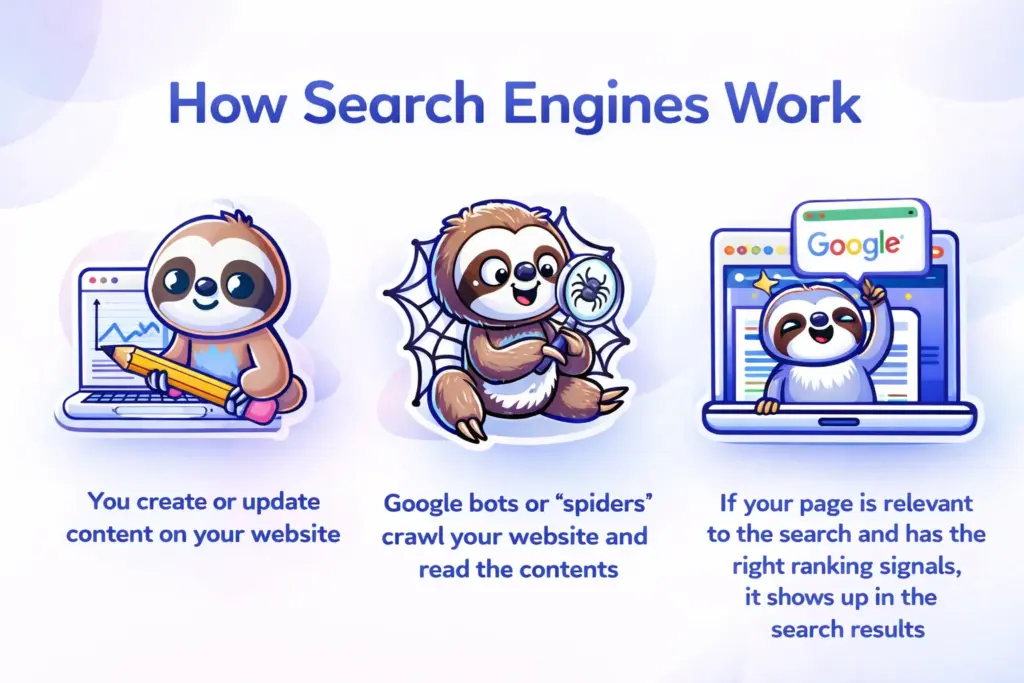
1. Discovery
Google first needs to find the page. It may discover it through:
- your XML sitemap
- internal links on your website
- backlinks from other websites
- social mentions or external references
2. Crawling
Once the page is discovered, Googlebot visits it and reads the content, code, links, and metadata.
3. Processing
After crawling, Google evaluates the page. It looks at the structure, content quality, relevance, canonical setup, technical health, and other signals before deciding whether to include it in the index.
4. Indexing and Ranking Consideration
If Google decides the page is useful and technically accessible, it gets added to the index. After that, it can begin competing for rankings.
This process is automatic, but website owners can influence how efficiently it happens.
Why Faster Indexing Matters
Fast indexing is not just a technical win. It directly affects how quickly your content can start working for your business.
When Google indexes a post faster, you gain benefits like:
| Benefit | Why It Matters |
|---|---|
| Faster search visibility | Your blog post can start appearing in search sooner |
| Earlier traffic potential | New content can attract clicks without long delays |
| Better timing on trends | You can publish around news, updates, or seasonal demand and get discovered sooner |
| Stronger site growth | More indexed pages over time can strengthen your overall search presence |
If you publish useful content regularly but it takes too long to get indexed, you lose momentum. In competitive niches, that delay can mean someone else captures the search traffic first.
Why Some Blog Posts Take Longer to Get Indexed
Not every page gets indexed at the same speed. Google prioritizes pages based on trust, technical quality, internal structure, and perceived value.
A few common reasons for slow indexing include:
- weak internal linking
- poor technical SEO
- thin or duplicate content
- low site authority
- crawl budget limitations
- missing or outdated sitemaps
- slow server response or frequent errors
In other words, indexing speed is not random. It often reflects how well your site is set up and how easy it is for Google to trust and process your content.
1. Use the URL Inspection Tool in Google Search Console
If you want the fastest direct way to notify Google about a new or updated blog post, start with the URL Inspection Tool in Google Search Console.
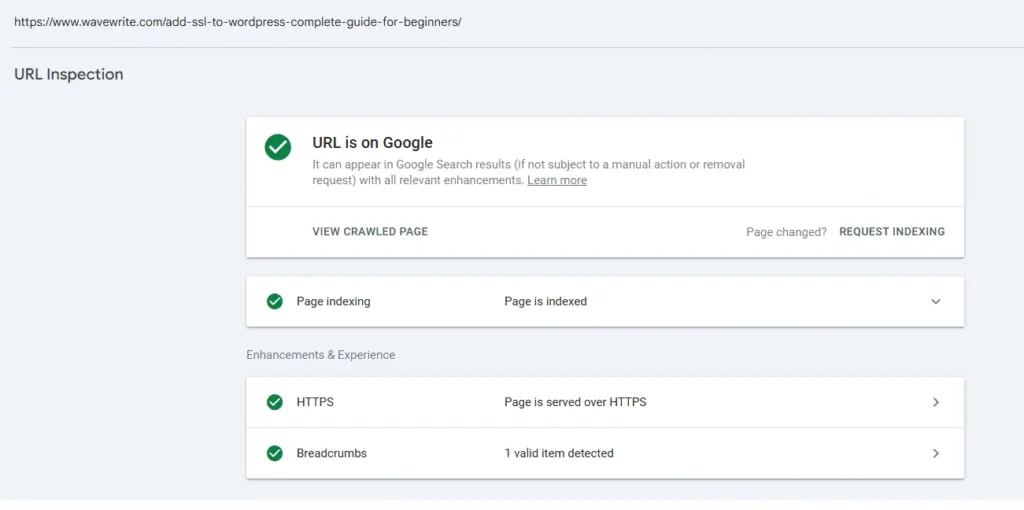
This tool lets you:
- check whether a page is already indexed
- review crawl and indexing details
- request indexing manually after publishing or updating content
To use it:
- Open Google Search Console
- Paste the exact blog post URL into the search bar at the top
- Review the indexing status
- If the page is not indexed, or if you updated it, click Request Indexing
This does not guarantee instant indexing, but it is one of the best ways to push Google to recheck important pages quickly.
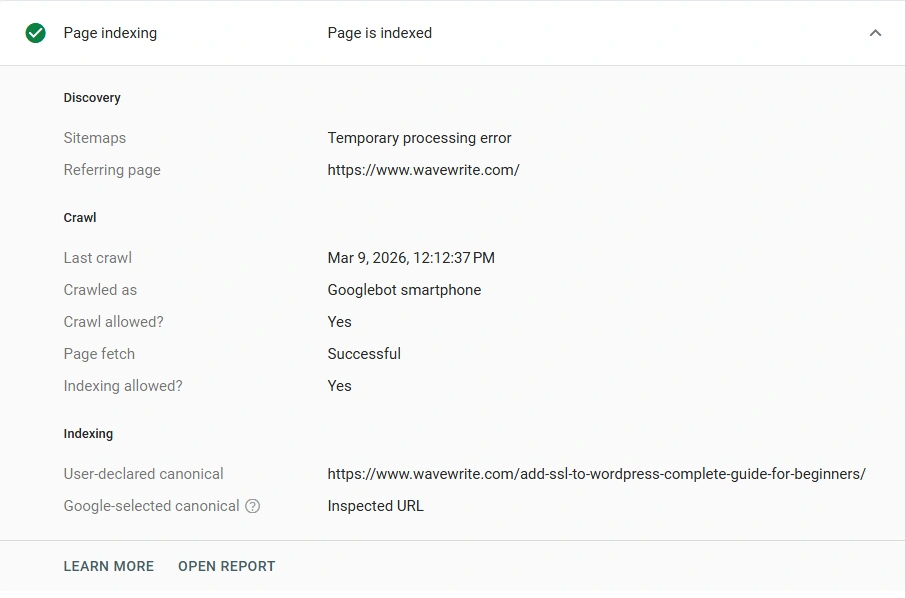
It also helps confirm useful details like:
- whether the page was found through your sitemap
- the last crawl date
- whether Google sees the correct canonical URL
- whether there are mobile or crawl issues affecting the page
For important blog posts, this should be one of your first steps after publishing.
2. Submit and Maintain a Clean XML Sitemap
An XML sitemap helps Google discover the important pages on your website more efficiently. It acts like a roadmap that lists the URLs you want search engines to crawl.
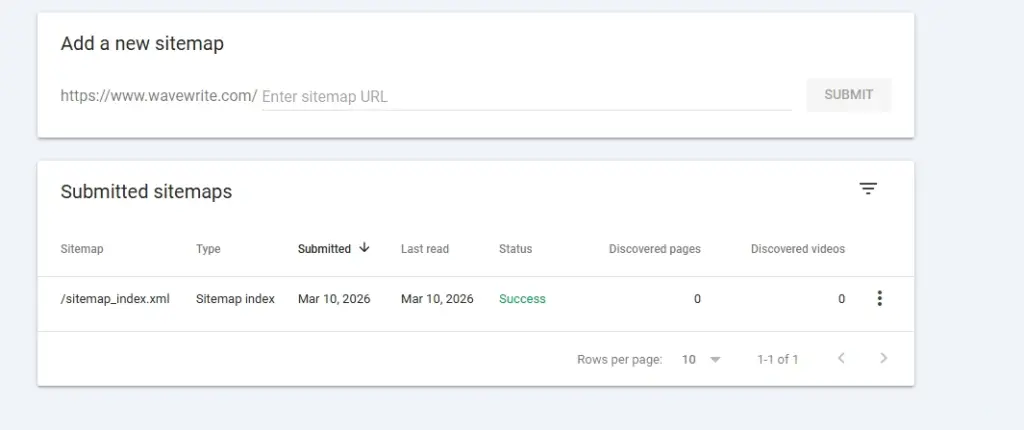
For most blogs, the sitemap is usually found at something like:
https://example.com/sitemap.xml
If you use WordPress, your SEO plugin often creates and updates this automatically whenever you publish new content.
Once your sitemap exists, you should submit it in Google Search Console:
- Go to Indexing → Sitemaps
- Enter your sitemap URL
- Click Submit
A sitemap does not force indexing, but it improves discovery, especially for new blog posts and recently updated content.
To keep your sitemap effective:
- include only indexable pages
- avoid broken URLs
- remove noindex pages from the sitemap
- keep it updated automatically whenever possible
A messy sitemap can slow things down instead of helping.
3. Strengthen Internal Linking to New Blog Posts
Internal links are one of the clearest ways to show Google that a page matters.
If your new article is buried deep in your site and nothing links to it, Google may find it eventually, but not as quickly. On the other hand, when multiple relevant pages link to a new post, it becomes easier for crawlers to discover and prioritize it.
Some of the best ways to improve internal linking include:
- linking from relevant older blog posts
- adding new articles to category pages
- using related posts sections
- including links in navigation or featured content blocks
- connecting content through topic clusters
For example, if you publish a new post about WordPress SEO, it makes sense to link to it from your existing articles on keyword research, site speed, technical SEO, or SEO plugins.
The goal is to make sure your most important content is never too many clicks away from your homepage or major sections.
4. Build More Backlinks Over Time
Backlinks do not just help rankings. They also help with discovery and crawl frequency.
Websites with stronger authority usually get crawled more often, and their new pages tend to get indexed faster. That is because Google sees those sites as more established and worth revisiting frequently.
You do not need hundreds of links to benefit. Even a few relevant, quality backlinks can help Google find your content sooner and treat your site as more trustworthy over time.
Strong backlink sources can include:
- guest posts
- industry mentions
- digital PR
- resource pages
- roundups
- citations from relevant websites
This is more of a long-term strategy than an instant fix, but it has a major effect on indexing speed over time.
5. Share New Posts on Social Media and Distribution Channels
Social media does not directly guarantee indexing, but content distribution helps your blog get discovered faster.
When you share a new blog post across platforms like LinkedIn, X, Facebook, or niche communities, you increase the chance that:
- Google discovers the page sooner
- other sites link to it
- users visit and engage with it
- the content gains visibility faster overall
This is especially useful for fresh content, product launches, news-based posts, or important updates.
Social sharing also supports a bigger content marketing strategy. The more visible your blog becomes after publishing, the more likely it is to attract natural engagement and links.
6. Improve On-Page SEO Before Publishing
A page that is well-optimized is easier for Google to understand and evaluate.
If your post lacks structure, metadata, or clarity, Google may still crawl it, but it may take longer to assess its purpose and value.
Strong on-page SEO helps by making your content clearer and more complete.
Important elements include:
- a clear title tag
- a useful meta description
- clean headings such as H1, H2, and H3
- descriptive image alt text
- relevant schema markup where appropriate
- concise, readable URLs
- mobile-friendly layout
- fast loading speed
Here is a practical checklist:
| On-Page Element | Why It Helps |
|---|---|
| Title tag | Helps Google understand the page topic |
| Meta description | Improves clarity and click appeal |
| Headers | Creates structure for users and crawlers |
| Alt text | Adds context to images |
| Schema markup | Helps Google interpret page type and details |
| Clean URL | Makes the topic obvious and easy to crawl |
Pages with weak on-page SEO are harder to process and may get lower crawl priority.
7. Fix Technical SEO Issues That Slow Down Indexing
Technical problems often block or delay indexing more than people realize.
Even good content can struggle if Google runs into errors, redirect issues, blocked paths, or duplicate URL confusion.
A few key areas to check are:
Robots.txt
Make sure you are not accidentally blocking important blog content from being crawled.
A basic example might look like this:
User-agent: *
Allow: /
Disallow: /wp-admin/
Disallow: /cdn-cgi/
Sitemap: https://example.com/sitemap.xml
This tells search engines to crawl the public site while avoiding unnecessary admin or system paths.
Canonical Tags
Canonical tags tell Google which version of a page should be treated as the main one.
For example:
<link rel="canonical" href="https://example.com/blog/indexing-guide">
This is important when similar URLs exist because of categories, parameters, tracking tags, or filtered views.
Without strong canonical signals, Google may waste time crawling duplicate versions.
Broken Pages and Server Errors
If your site has:
- 404 errors
- 500 server errors
- broken internal links
- redirect loops
these issues can disrupt crawling and reduce indexing efficiency.
Use Google Search Console to review indexing and error reports regularly. Fix server issues quickly, and redirect outdated URLs when necessary.
8. Focus on Publishing Higher-Quality Content
Google does not want to index every page equally. It prefers pages that offer value.
If your site contains too much thin, outdated, repetitive, or low-quality content, Google may spend less time crawling and indexing new pages efficiently.
This is where crawl budget becomes important. Every site has limited crawl attention. If too much of that attention is wasted on weak pages, stronger posts may take longer to get indexed.
A better strategy is to focus on:
- publishing fewer but better articles
- updating and improving older content
- merging duplicate posts
- redirecting outdated low-value pages
- building stronger topic clusters instead of thin one-off posts
In many cases, improving existing content produces better results than flooding your site with weak new posts.
9. Use Google’s Official Indexing Tools the Right Way
When it comes to indexing tools, the safest and most effective options are still Google Search Console and your sitemap setup.
Google has become stricter about abuse of automated indexing systems, and many third-party “instant indexing” tools are no longer reliable. Some methods that used to be pushed as shortcuts are now risky or ineffective.
The safest tools to rely on are:
- Google Search Console URL Inspection Tool
- XML sitemap submission
- Bing Webmaster Tools for Bing-based ecosystems
Bing Webmaster Tools are worth setting up too, because Bing powers not just Bing search, but also several other discovery systems and AI-based search tools.
Avoid depending on unofficial indexing shortcuts that promise guaranteed fast results. Long-term, they are not a safe strategy.
Why Google May Still Not Index Your New Blog Posts
Even if you do everything right, some pages may still face delays.
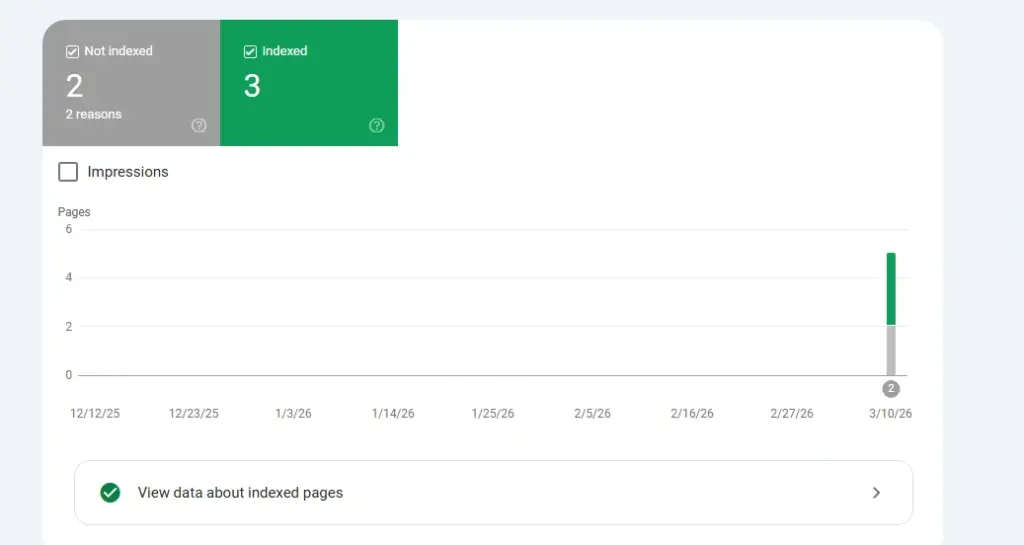
Google Search Console usually gives clues about why a page is not indexed.
Here are some common status types and what they usually mean.
Discovered – Currently Not Indexed
Google knows the page exists, but has not crawled or indexed it yet.
Possible reasons:
- low crawl priority
- too many weak pages on the site
- server performance issues
- weak internal linking
Crawled – Currently Not Indexed
Google visited the page, but chose not to add it to the index yet.
Possible reasons:
- thin content
- duplicate or low-value content
- weak uniqueness
- unclear purpose or poor quality signals
Not Found (404)
Google tried to access the page but could not find it.
Possible reasons:
- broken internal links
- removed content
- incorrect URLs in sitemap
- missing redirects after URL changes
No Status or Missing Page Data
If the page does not seem recognized at all, check for:
- sitemap issues
- canonical problems
- DNS or domain setup problems
- crawl blocking in robots.txt
- broken site architecture
The fix depends on the cause, but in most cases the path is the same: improve accessibility, improve page quality, then resubmit the URL for indexing.
A Simple Fast-Indexing Workflow to Follow
If you want a practical process after publishing a blog post, use this sequence:
| Step | Action |
|---|---|
| 1 | Publish the post with strong on-page SEO |
| 2 | Link to it from relevant existing articles |
| 3 | Make sure it appears in your sitemap |
| 4 | Submit the URL in Search Console |
| 5 | Share it across social and distribution channels |
| 6 | Monitor indexing status in Search Console |
| 7 | Fix any crawl or technical issues if the page is delayed |
This workflow is simple, repeatable, and far safer than trying to game indexing with shortcuts.
Final Thoughts
Getting Google to index your blog faster is not about one trick. It is about making your content easy to discover, easy to crawl, and worth indexing.
The fastest results usually come from combining a few core practices:
- submit important URLs through Search Console
- maintain a clean sitemap
- strengthen internal linking
- fix technical SEO issues
- publish higher-quality content
- build long-term authority with backlinks and distribution
When those pieces are in place, Google can process your new posts much more efficiently.
Fast indexing matters because it shortens the gap between publishing and visibility. And in SEO, reducing that delay can make a real difference in how quickly your content starts bringing in traffic, leads, and growth.