Follow Me On Social Media!



Wait… Is Google Seriously Ignoring Your WordPress Website?
Yeah, it happens more than you’d think — and it’s incredibly frustrating.
You’ve spent hours (maybe weeks) building your WordPress site. The design looks great, your content is solid, and you’re genuinely proud of it. Then you go to Google… and nothing. Crickets. Your site doesn’t show up anywhere.
Here’s the cold, hard truth: if Google isn’t indexing your WordPress website, you basically don’t exist online. Doesn’t matter how good your content is. Doesn’t matter how pretty your homepage looks. If Google can’t find you, neither can anyone else.
The wild part? Most of the time, site owners are accidentally blocking Google themselves — without even knowing it. So let’s fix that. In this guide, I’ll walk you through all the reasons Google might be ghosting your site, and exactly what to do about each one.
Table of Contents
First — What Even Is “Indexing”?
Quick refresher before we dive in, because this term gets thrown around a lot.
Basically, Google has a giant robot (called Googlebot) that crawls around the internet reading websites and saving that info into a huge database called the index. When you type something into Google Search, it pulls results from that index.
So if your site isn’t in the index? It literally doesn’t show up in search. Ever. For anything.
To check if you’re indexed right now, just type site:yourdomain.com into Google. If pages show up — great, you’re in. If nothing comes up — we’ve got work to do.
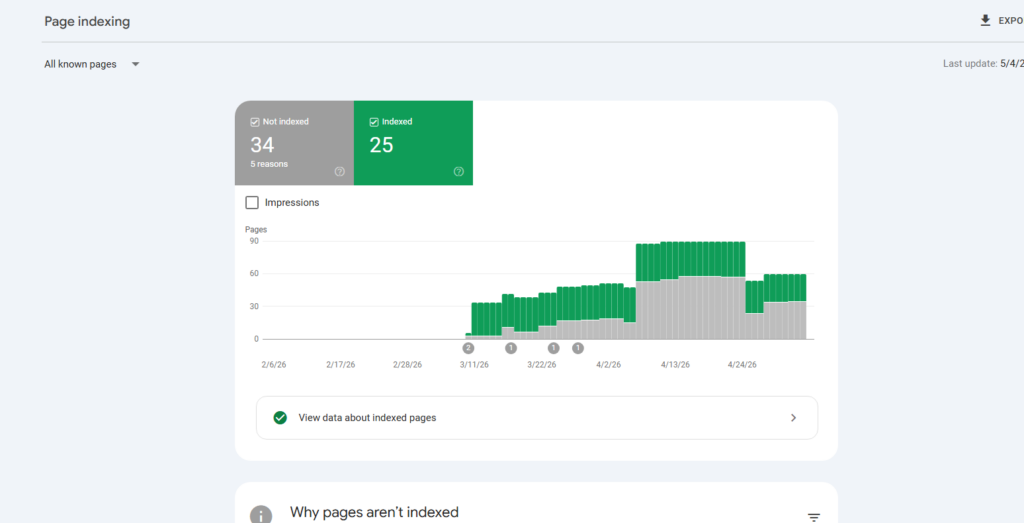
The most reliable way to check (and fix things) is through Google Search Console. It’s free, it’s from Google, and honestly you should already have it set up. If you don’t, do that first — it’ll be your best friend through all of this.
Alright, let’s get into it.
The Real Reasons Google Isn’t Indexing Your WordPress Website
1. You Left the “Hide from Google” Setting Turned On 🤦
I kid you not — this is the #1 cause. And it’s so embarrassingly simple that people want to disappear when they realize it’s the problem.
WordPress has a little checkbox under Settings → Reading that says “Discourage search engines from indexing this site.” It’s super handy when you’re building a site and don’t want Google stumbling across your half-finished work. But if you forget to untick it before you launch? Google stays away. Forever. Until you fix it.
The Fix: Head to Settings → Reading in your WordPress dashboard, make sure that box is unchecked, and save. That’s it. Seriously, check this one first before doing anything else.
2. A noindex Tag Is Quietly Hiding Individual Pages
Okay so maybe your site-wide setting is fine, but individual pages might still be hiding from Google. SEO plugins like Yoast SEO, Rank Math, and All in One SEO let you set a noindex tag on specific pages — which is useful, but also an easy thing to accidentally get wrong.
The Fix: Go into the pages you care about most, open your SEO plugin’s settings for that page, and make sure indexing is actually turned on. You can also check your whole site at once through the Coverage report in Google Search Console — it’ll show you exactly which pages are being excluded and why.
3. Your robots.txt File Is Being Way Too Aggressive
Think of your robots.txt file as a bouncer at a club. It tells bots like Googlebot what they’re allowed to access. The problem is, sometimes that bouncer is a little overzealous.
If your robots.txt contains something like:
Disallow: /
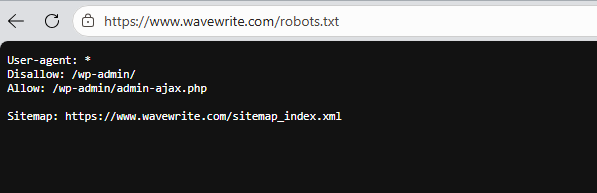
…that’s basically telling every bot on the internet to turn around and leave. The whole site. Off limits. Not great.
The Fix: Go to yourdomain.com/robots.txt and have a look. If you see any overly broad Disallow rules, clean them up. Google also has a robots.txt Tester tool in Search Console where you can test how Googlebot reads your file — definitely worth using.
Want to go deeper on this? Google’s official robots.txt documentation is actually pretty readable.
4. You Don’t Have a Sitemap (Or Yours Is Broken)
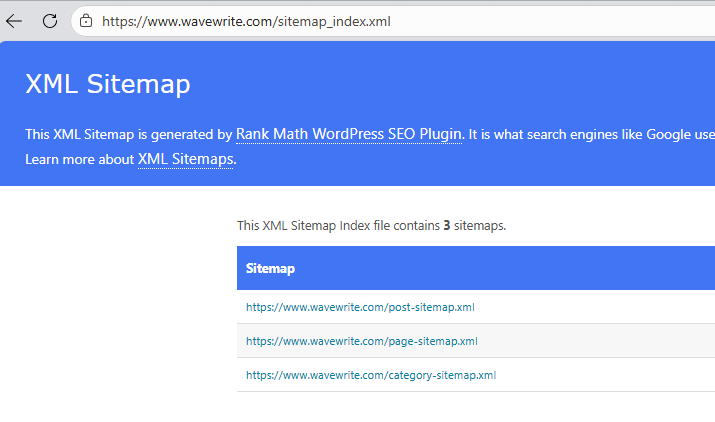
An XML sitemap is basically a cheat sheet you hand to Google that says “hey, here are all the pages I want you to look at.” Without one, Googlebot has to wander around your site trying to find pages on its own, which is slow and hit-or-miss.
Common sitemap problems on WordPress:
- There isn’t one at all
- It exists but you never submitted it to Google
- It’s returning a 404 error (dead link)
- It’s full of noindexed or broken URLs
The Fix: If you’re using Yoast SEO or Rank Math, they’ll generate a sitemap for you automatically. Then go to Google Search Console → Sitemaps and paste your sitemap URL in. Usually it’s something like yourdomain.com/sitemap_index.xml. Easy win.
5. Your Site Is New and Google Just… Hasn’t Got There Yet
Sometimes it really is just a waiting game. Google doesn’t crawl every new site the second it launches. It tends to spend more time on established sites with lots of incoming links. A brand new domain with zero backlinks? It might sit there untouched for weeks.
The Fix: Don’t just wait around though — give it a nudge:
- Use the URL Inspection Tool in Google Search Console to manually submit your pages
- Get a few quality backlinks from other sites (even one from a reputable source helps a lot)
- Share your stuff on social media to get some early traffic rolling in
6. Your Site Is Slow and Google’s Given Up On It
Here’s something most people don’t realize: Google only has so much time to spend crawling your site. It’s called your “crawl budget,” and if your site is painfully slow, Googlebot basically shrugs and moves on before it’s finished. Fewer pages crawled = fewer pages indexed.
Usual suspects: cheap hosting, giant unoptimized images, too many plugins slowing everything down.
The Fix:
- Switch to a faster, lighter WordPress theme
- Use a caching plugin — WP Rocket is excellent, W3 Total Cache works too
- Compress your images with ShortPixel or Imagify
- Check your speed score at Google PageSpeed Insights — aim to get out of the red
7. Your Content Is Thin, Duplicate, or Just… Not That Useful
Google’s gotten pretty smart. If your site is full of super short posts that don’t really say much, or if you’ve got the same content copy-pasted across multiple pages, Google might just decide it’s not worth indexing. Brutal, but fair.
The Fix:
- Write content that actually helps people — longer, more thorough, more original
- Use canonical tags when you do have similar pages, to tell Google which one is the “main” version
- Merge weak short posts into one solid, comprehensive article
- Check for duplicate content issues with tools like Siteliner or Screaming Frog
8. Google Has Actually Penalised Your Site
This one’s a bit more serious. Sometimes Google’s team manually reviews a site and issues a penalty for breaking the rules — things like buying spammy backlinks, keyword stuffing, hiding text, or having a site that’s basically just thin affiliate content with nothing of real value.
The Fix: Go to Google Search Console → Security & Manual Actions → Manual Actions and see if anything’s flagged. If there is a penalty, fix whatever caused it, then submit a Reconsideration Request and cross your fingers.
For the full list of what Google considers a no-go, Google’s Search Essentials guide is worth bookmarking.
9. Broken Links and Crawl Errors Are Wasting Google’s Time
If Googlebot keeps running into dead ends — pages that return 404 errors, broken links, redirect loops — it’s basically wasting its crawl budget on your site going nowhere. Over time, it’ll just crawl less of your site.
The Fix:
- Check the Coverage report in Search Console for a list of crawl errors
- Install Broken Link Checker to find and fix internal broken links
- Set up proper 301 redirects for any pages you’ve moved or deleted
- Make sure your server isn’t throwing random 500 errors
10. JavaScript Is Confusing Googlebot
If you’re using a page builder like Elementor, Divi, or WPBakery, a lot of your content might be rendered via JavaScript. Google can read JavaScript — but it’s slower and less reliable than just reading plain HTML. If your text or links only appear after JavaScript loads, there’s a real chance Googlebot is missing them.
The Fix:
- In Google Search Console, use the URL Inspection Tool and hit “View Crawled Page” — this shows you exactly what Googlebot actually sees on your page
- If a lot of your content is missing from that view, you’ve found your problem
- Try the Rich Results Test too — it’s a quick way to see how Google interprets your page
11. Your Pages Are Orphaned — Nobody’s Linking to Them
Googlebot finds pages by following links. If you’ve got pages on your site that no other page links to, Googlebot may literally never find them. These are called “orphan pages” and they’re way more common than you’d think.
The Fix:
- Make sure every new post you publish links to at least a couple of related posts on your site — and that those posts link back
- Use a plugin like Link Whisper to spot any orphaned content you might have forgotten about
- Think about whether your category and tag archive pages need to be indexed, or if it’s better to canonicalize them
12. Your SSL Certificate Is Dodgy or Expired
Google really, really prefers HTTPS sites. If your SSL certificate is expired or there are mixed content issues (some parts of your page loading over HTTP while the rest is HTTPS), both Google and your visitors are going to get nervous.
The Fix:
- Make sure your SSL cert is valid and up to date — most decent hosts give you a free one through Let’s Encrypt
- Force HTTPS across your whole site via your WordPress settings or
.htaccess - Use the Really Simple SSL plugin to track down and fix mixed content issues
How Do You Know If It’s Actually Working?
Once you’ve gone through this list and made your fixes, here’s how to confirm things are improving:
- Search
site:yourdomain.comin Google — count how many pages show up - Check the Coverage report in Search Console — it’ll show indexed pages vs. errors
- Use the URL Inspection Tool to test specific pages and manually request indexing
- Check your Sitemap report to confirm Google is reading it properly
A Few Extra Tips to Speed Things Up
- After publishing any important page, immediately go to the URL Inspection Tool and click “Request Indexing” — it genuinely works
- Get some backlinks from well-known sites in your niche — they’re one of the biggest signals that your site is worth crawling
- Post regularly — an active site gets crawled more often than a stale one
- Add schema markup (structured data) to your pages so Google understands your content better — Yoast and Rank Math both handle this
- Check Search Console at least once a week — problems are way easier to fix when you catch them early
Alright, Bottom Line
If Google isn’t indexing your WordPress website, don’t panic. Every single issue on this list has a fix — some of them take literally 30 seconds (I’m looking at you, checkbox #1). The key is just going through things systematically, using Google Search Console as your guide, and not assuming it’s some deep unsolvable mystery.
Your site deserves to show up. Go fix it! 🚀
Keep Reading
- WordPress Low Competition Keywords: Here’s How to Actually Find Them in 2026 – WaveWrite
- No Traffic After 6 Months? Here’s Exactly What You’re Doing Wrong – WaveWrite