
Follow Me On Social Media!




So picture this: you spent an entire weekend shooting, editing, and uploading gorgeous photos to your WordPress site. You’re proud of them. They look chef’s kiss. Then one random Tuesday you stumble across those exact same images on someone else’s website. No credit. No permission. Just… gone.
Yeah. It’s a special kind of infuriating.
Here’s the thing — image theft in 2026 is genuinely out of control. AI scraping bots, shady browser extensions, people who just right-click everything like it’s a buffet… it’s a lot. But don’t panic. There are some really solid ways to protect your images, and I’m going to walk you through all of them. Some are dead simple, some are a little more technical — but all of them are worth doing.
Table of Contents
Why Should You Even Care?
I know, I know — “just watermark it and move on,” right? But image theft is actually way more annoying than it looks on the surface. When someone nabs your visuals without asking, it can:
- Make your brand look generic when your unique stuff shows up on a competitor’s site
- Mess with your SEO because Google gets confused about who actually owns the image
- Cost you real money, especially if you’re selling photos or running a members-only site
- Make you look like the copycat if visitors see your images floating around the internet
Copyright law technically has your back from the moment you create something — no registration needed. But let’s be real, taking someone to court over a stolen photo is slow, expensive, and exhausting. Way easier to just make theft annoying enough that people give up and move on.
7 Ways to Protect Your Images (Without Losing Your Mind)
1. Block Hotlinking — This One’s a Big Deal
Hotlinking is when someone embeds your image on their site using your server’s URL. So their visitors see your photo, but you’re the one paying for the bandwidth. It’s basically someone siphoning gas from your car while you sleep.
The cleanest fix is blocking it at the server level. If you’re on Apache, you can drop this into your .htaccess file:
RewriteEngine on
RewriteCond %{HTTP_REFERER} !^$
RewriteCond %{HTTP_REFERER} !^http(s)?://(www\.)?yourdomain.com [NC]
RewriteRule \.(jpg|jpeg|png|gif|webp)$ - [NC,F,L]
If code makes your eyes glaze over, no worries — if you’re using Cloudflare, there’s literally a toggle for hotlink protection. One click. Done. This should be your very first move.
2. Slap a Watermark on There
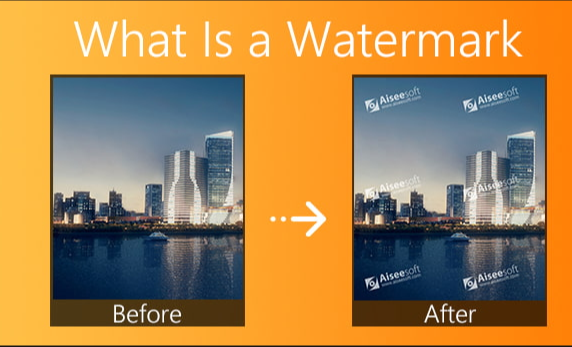
Watermarks get a bad rap for being ugly, but hear me out — they’re actually genius. Even if someone steals your image, your logo or website URL is right there in the picture. Congrats, you just got free advertising from a thief. Not bad.
WordPress has some great plugins for this:
- Image Watermark — free, easy, automatically applies watermarks for you
- Envira Gallery — great if you’re running photo galleries, has a built-in watermarking add-on
- Imagify — does watermarking and image optimization, two birds, one plugin
One sneaky tip: don’t just stick your watermark in the corner — that’s the first thing someone crops out. Put it somewhere unexpected, like diagonally across the center or scattered across the image. Makes it way harder for AI tools to strip out.
Oh, and always keep a clean, un-watermarked copy of your originals somewhere safe before uploading. Trust me on this one.
3. Disable Right-Click (The Low-Tech Classic)
This is the most beginner-friendly option and honestly pretty effective against casual image grabbers. Most people who steal images just right-click → “Save As” — they’re not hackers, they’re just lazy. Remove that option and a huge chunk of them will just… give up.
Plugins like WP Content Copy Protection & No Right Click handle this in seconds. Selective Image Guard is another solid choice if you want more control over which images get protected.
Now, will this stop a determined tech-savvy person? Nope! They can open developer tools and find the image URL without breaking a sweat. But here’s the reality check: most image thieves aren’t tech wizards. They’re opportunists. Make it slightly inconvenient and they’ll move on to an easier target. Same reason you lock your front door even though a burglar could technically break a window.
4. Block Direct File Access
Here’s one a lot of people don’t think about: even if someone can’t right-click, they might still be able to type your image’s direct URL into their browser — something like yourdomain.com/wp-content/uploads/cool-photo.jpg — and download it that way.
The Prevent Direct Access Gold plugin closes that loophole. Anyone who tries to sneak in through the back door just gets a 404 error, like the file doesn’t exist. Works on images, PDFs, videos, audio files — the whole deal.
This one’s especially worth it if you’re running a membership site or selling digital downloads. You don’t want someone sharing a direct link to your premium content in a Facebook group.
5. Embed Copyright Info Into the File Itself
This is the sneaky background layer of protection that most people completely skip. Every image file has hidden data baked into it called EXIF metadata — things like when it was taken, what camera was used, and (here’s the useful part) who owns it.
You can add your name, website, and a copyright notice directly into this metadata using Lightroom or Photoshop before you even upload anything. So even if someone strips your watermark or downloads the image without your knowledge, your info is still quietly sitting inside the file.
Don’t forget to also add a visible copyright notice to your WordPress footer. Most photography themes have this built in, but if yours doesn’t, a simple text widget gets the job done.
6. Use Reverse Image Search to Hunt Down Thieves
Okay, this one is less about preventing theft and more about catching it — which is equally important. You can’t fix what you don’t know about.
Google Reverse Image Search (images.google.com) is free and dead simple — just upload your photo and it’ll show you everywhere that image appears online. Make it a habit to check your most important images every couple of months.
For something more automated, Ahrefs can flag suspicious backlinks pointing to your images, and TinEye does reverse image searching with an even bigger database than Google.
Found someone using your stuff without permission? Here’s the play:
- Screenshot everything as proof
- Send them a polite (but firm) message asking them to take it down
- If they ignore you, file a DMCA takedown with their host or Google
Hosts take DMCA notices seriously — most act fast.
7. Only Show Low-Res Previews Publicly
If you’re actually selling your photos or artwork, this is the smartest move on the whole list: just don’t put the good stuff out in the open.
Show a compressed, lower-resolution preview on your public site — enough for people to see what they’re getting — and keep the full-resolution original locked behind a purchase or login. Plugins like Easy Digital Downloads or WooCommerce handle this really well.
No high-res image on your public server means nothing worth stealing. Problem solved before it even starts.
Real Talk: Nothing Is 100% Foolproof
I’d be lying if I told you any of this makes your images completely unstealable. A determined person can always take a screenshot. That’s just… life on the internet in 2026.
But here’s the mindset shift that actually helps: you’re not trying to build an unbreakable vault. You’re trying to make theft annoying enough that most people don’t bother. Add enough friction and the opportunists move on to easier targets.
Your best bet is to layer several of these methods together:
✅ Hotlink protection via your server or Cloudflare
✅ Watermarks in smart, hard-to-crop positions
✅ Right-click disabled for the low-effort crowd
✅ EXIF metadata quietly doing its thing in the background
✅ Regular reverse image searches so you catch anything that slips through
None of these alone is a silver bullet. All of them together? Pretty solid armor.
Okay, Go Do Something About It
Your images represent real time, real effort, and often real money. They deserve to be protected like the assets they are — not just crossed fingers and a hope that nobody notices.
Start small: enable hotlink protection today, grab a watermarking plugin, and Google reverse image search your five most popular photos right now. You might find some unpleasant surprises, but at least you’ll know what you’re dealing with.
Already been hit? Document everything, file that DMCA, and then get these protections in place so it doesn’t happen again.
Your work is yours. Keep it that way. 🔒
Used one of these methods and it actually worked? Or got burned by image theft and have a story to tell? Drop it in the comments — seriously, we love hearing from you.